

A WPForms Alternative That Doesn’t Lock Features Behind Expensive Plans
-
- Comparison
- 8 mins read

Looking for a WPForms Alternative? Formgent Gives You More Without the Paywall
Building a form on WordPress should not feel like a trap. You install a “free” plugin, and it works fine at first. Then you try to add one useful feature, like showing a field only when someone picks a certain option, and you hit a wall. That feature needs a paid plan.
This is how a lot of form plugins work, including WPForms. The free version gets you started, but the features people actually want sit behind a paywall.
FormGent works differently. Its free plugin already includes the things people usually have to pay for: conditional logic, an AI form builder, and payment collection with no extra fee.
In a hurry? Here’s the full FormGent feature list. Otherwise, keep reading for the full picture.
A Quick Introduction to FormGent
FormGent is a free WordPress plugin for building forms. The team behind it, wpWax, also makes Directorist, a well-known WordPress directory plugin with more than 20,000 active users.
With FormGent’s free version, you can build classic forms, chat-style conversational forms, and forms broken into multiple steps. You get an AI tool that can build a form from a simple written prompt. You can collect payments through Stripe, PayPal, and Mollie. And you can connect your forms to tools like Google Sheets, Mailchimp, Zapier, and your CRM, all without paying anything.
The Feature Everyone Actually Wants: Conditional Logic
Here’s the biggest reason people go looking for a different form plugin. They want a form that reacts to what someone types. Show a field only if the visitor picks “Other.” Hide a whole section unless someone checks a certain box.
This is called conditional logic, and it’s part of FormGent’s free plan. You don’t need to buy anything to use it. It works whether you’re building a plain form, a step-by-step form, or a conversational one.
If this is the one feature you’re switching plugins for, you already have your answer.
Three Ways to Build a Form, All Free
Not every form should look the same. A short contact form works fine as a single page. A long application form is easier to fill out in steps. A quiz or a feedback form often feels better as a conversation, one question at a time.
FormGent lets you choose between all three styles, and none of them cost extra:
- Classic forms — the normal layout, all fields on one page.
- Multi-step forms — split into stages, with a progress bar so people know how far they’ve gotten.
- Conversational forms — one question shown at a time, like a short chat. This style tends to get more people to finish filling out the form.
You can pick whichever fits the form you’re building, not whichever fits your budget.
Build a Form by Just Describing It
Instead of dragging and dropping every single field, you can type out what you need. Something like “a contact form with a name, an email, and a message box.” FormGent’s AI builds it for you in a few seconds.
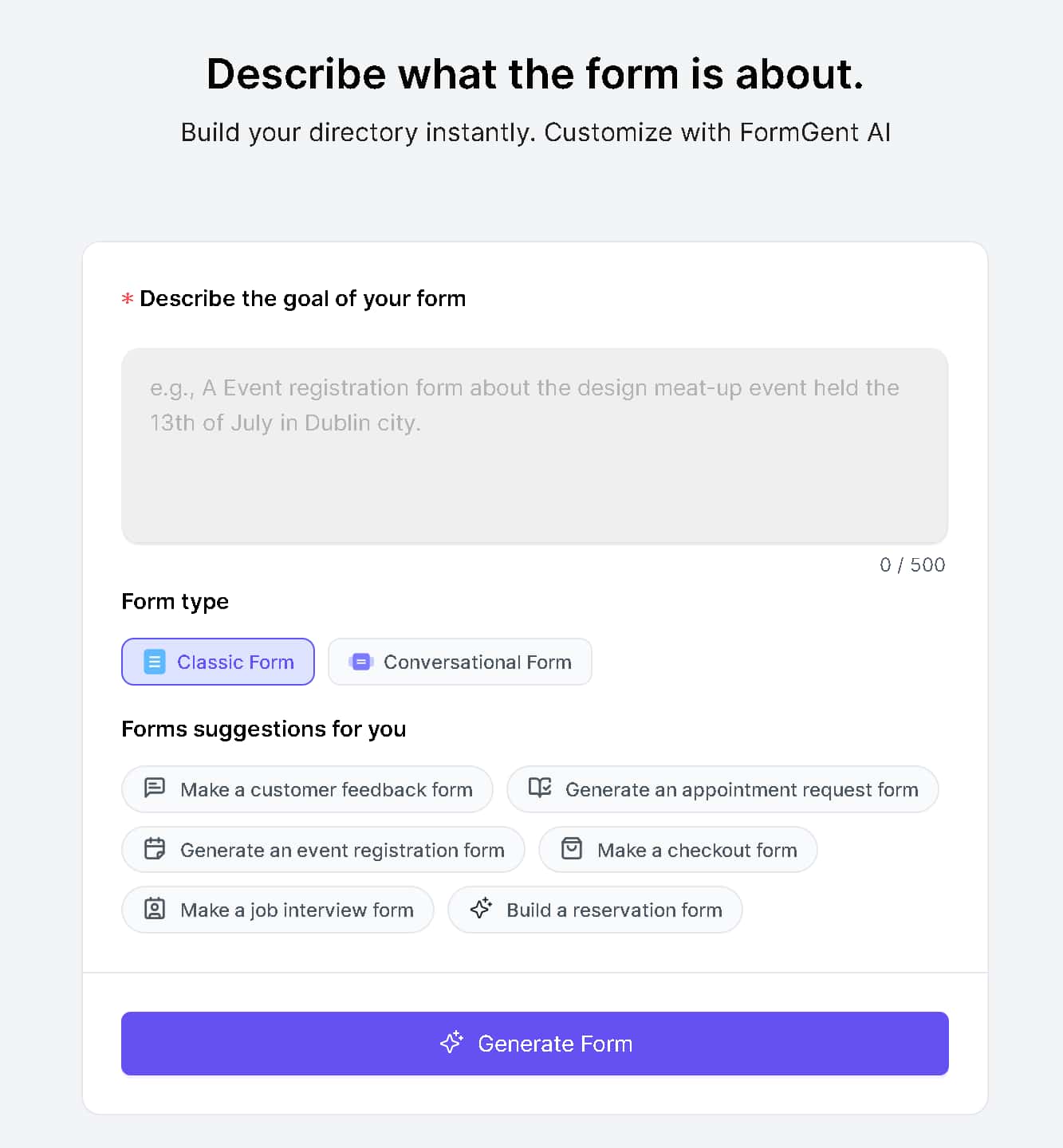
This is included free, with a starting limit of 5 AI-built forms. After that, FormGent Pro removes the limit.
Let an AI Assistant Build Your Forms For You
Here’s another way FormGent uses AI, one you might not expect. You can connect an AI assistant, like Claude, ChatGPT, or Cursor, directly to your WordPress site. Then, instead of opening the form builder yourself, you just tell the assistant what you want, and it builds or updates the form for you.
Setting this up is free. You’ll need a fairly recent version of WordPress, plus one small helper plugin (also free) that makes the connection possible. Once that’s done, your AI assistant can talk to FormGent directly. Any forms it builds this way count toward the same 5 free AI forms mentioned earlier, so there’s nothing extra to buy. For the full walkthrough, see how to let your AI assistant manage your forms.
Take Payments Without Giving Up a Cut
FormGent connects to Stripe, PayPal, and Mollie so you can collect one-time payments directly through your form. Turn on a gateway in FormGent’s settings, add the payment field, and you’re ready to charge for a product, a service, or a donation.
There’s no extra fee added by FormGent on top of what Stripe or PayPal already charges you. If you want the full setup steps, including how to build a proper order form with quantities and totals, read our guide to creating a payment form in WordPress.
Subscription or recurring billing is the one payment feature that needs FormGent Pro. Everything else about taking a payment stays free.
Quizzes, Surveys, and Polls, Built In
Want to run a scored quiz, a short customer survey, or a simple poll? That’s part of the free plugin too. You can set point values, show a results screen, and collect answers, all without adding a separate plugin or paying for an add-on.
Your Tools, Already Connected
A lot of plugins treat integrations as a reward for upgrading. FormGent includes several right out of the box:
- Google Sheets, so form entries can flow straight into a spreadsheet
- Mailchimp, for adding new subscribers automatically
- Zoho CRM, for sending leads into your CRM
- Zapier, which connects FormGent to thousands of other apps
- Directorist, for directory and listing sites
- WPML, for building forms in more than one language
- Google Maps, for location-based fields
- Spam protection through Google reCAPTCHA, hCaptcha, and Cloudflare Turnstile — see our comparison of honeypot, CAPTCHA, and Turnstile if you want to know which one actually fits your site
That’s eight tools connected for free, not a locked list that only opens up once you pay.
More Free Features Worth Knowing About
A few other things are worth mentioning, since they don’t always come up first but matter once you’re actually building:
You can turn form entries into PDFs, including invoices, using the built-in PDF generator. Every response lands in a dedicated area where you can read it, add notes, mark it as starred, and export it to CSV, Excel, or PDF. You get basic analytics so you can see how each form is performing. There are Register and Login blocks, so you can build a custom WordPress signup or sign-in form without installing a separate membership plugin. And you get standard fields too, like file uploads, repeater fields for adding multiple entries, and a GDPR consent field for handling privacy requirements properly.
You can also publish a form almost anywhere: as a Gutenberg block, a shortcode, an Elementor widget, a shareable link, or embedded through an iFrame.
Ready to try it? Start with our guide to building a form in WordPress.
What You’d Pay FormGent Pro For
FormGent is honest about where the free plan ends. The paid plan is for things like digital signatures, webhooks, sending different confirmation messages based on how someone answered a question, letting people save an unfinished form and come back later, verifying someone’s identity with a one-time code, accepting front-end post submissions, and setting up recurring subscription payments.
Look at that list again. None of it is conditional logic, the AI builder, conversational forms, or the integrations above. Those stay free. FormGent’s paid plan is for the more advanced, less common needs, not the basics.
A Plugin That’s Actively Built and Well Rated
FormGent is on version 1.12.3, updated within the past few days, and rated 4.4 out of 5 stars. It works with WordPress 6.6 and newer, and it provides 46 separate blocks inside the WordPress editor, everything from payment fields to login forms, all ready to use.
What It Costs If You Want More
| Plan | Price | Sites |
| Free | $0 | Unlimited use of everything in the free plan |
| 1 Site | $44/year (10% off) | 1 |
| 5 Sites | $84/year (15% off) | 5 |
| Unlimited Sites | $119/year (20% off) | Unlimited |
| Lifetime, 1 Site | $116 one-time | 1 |
| Lifetime, 5 Sites | $211 one-time | 5 |
| Lifetime, Unlimited | $319 one-time | Unlimited |
Every plan also comes as a one-time lifetime purchase, so if you’d rather pay once and be done with renewals, that option exists at every level.
For comparison, getting conditional logic, conversational forms, a quiz builder, and a CRM connection out of WPForms means buying its Pro or Elite plan. Those plans run $199.50 and $299.50 a year for the first year, then jump to $399 and $599 a year after that. FormGent’s Unlimited Sites plan, which already includes all of those features in the free version, costs $119 a year, or a one-time $319 if you never want to renew.
One more thing worth knowing: WPForms adds a 3% platform fee on payments collected through its free plugin or an expired license, on top of whatever Stripe or PayPal already charges. FormGent doesn’t add a matching fee on Stripe, PayPal, or Mollie payments.
Switching From WPForms? Do This First
- Export your current form entries. WPForms lets you download them as CSV, Excel, or PDF from your dashboard. Do this before changing anything else.
- Check your integrations. Compare what you use today against FormGent’s free list above (Google Sheets, Mailchimp, Zoho CRM, Zapier, Directorist, WPML, Google Maps).
- Confirm your payments still work. One-time Stripe, PayPal, and Mollie payments are covered free. Recurring payments need FormGent Pro.
- Test on a staging site first. Rebuild your most important form there before touching your live site.
There’s no one-click tool that pulls your old WPForms forms straight into FormGent. Plan to rebuild them by hand using FormGent’s builder, with your exported data as a reference.
Common Questions
Is FormGent really free to use?
Yes, and not in the watered-down way “free” usually means for a form plugin. Install it from WordPress and you get access to all features for free.
Will I pay a fee on payments I collect through FormGent?
No. FormGent doesn’t add a platform fee on Stripe, PayPal, or Mollie payments. You’ll still pay whatever standard processing fee your payment provider charges, but that applies no matter which plugin you use.
Can I build a conversational or multi-step form without upgrading?
Yes, both styles are included free, and you can switch between classic, multi-step, and conversational at any time.
Can I connect Claude, ChatGPT, or Cursor to FormGent?
Yes. With a recent version of WordPress and one small free helper plugin, an AI assistant can connect to your site and build or update FormGent forms for you. It’s part of the free plan.
Is FormGent GDPR-friendly?
FormGent includes a GDPR consent field so you can collect and record consent properly. Being fully GDPR-compliant depends on more than one plugin though, including your hosting and your privacy policy.
Can I move my forms from WPForms to FormGent?
Not automatically. There’s no built-in import tool yet. Export your WPForms data as a backup, then rebuild your forms in FormGent.
What does FormGent’s paid plan actually add?
Digital signatures, webhooks, one-time code verification, front-end post submissions, recurring subscription payments, and a few advanced reporting tools.
Try It Before You Decide
The best way to know if FormGent fits your site is to install it and build something. The free plan already has everything that don’t take a cut. Nothing here is a trial version waiting to run out.
See FormGent’s pricing or install the free plugin and start building.



norbertov1417
October 5, 2025Hi,
The plug in is great, but lacks an essential function for me, the custom URL redirect when finishing a form. When will that functionality be released?
Rezaul Karim
October 8, 2025Hi,
Thanks for your interest. For your information, this feature is already available in FormGent. To access it, use the right sidebar of your single form, go to Form Confirmation and then you will find options to set your Success Message as well as redirect. You can choose the page you want users to redirect to or set a custom URL.
For further information, please check this documentation: https://formgent.com/docs/single-form-setting/#1-toc-title