
Mastering Conditional Logic in Forms: A Guide to Personalized User Experiences
-
- Tips and Tricks
- 9 mins read
Filling out a form is typically very monotonous but yet we have to fill them out to get access to any modern services. Few months ago, I was checking in on a hotel for one of my vacations and on the booking form, they asked me back-to-back questions like how many kids I have and what are their ages.
Guess what I did? I abondoned the form and later a representative called me to make sure that I am no longer interested in their complex booking process and going with a more convenient option. With conditional logic in forms, such inconvenient questions can appear anytime.
Couldn’t they just ask if I had kids and they followed-up based on my response? This would not only save time for me, but also them by screening fewer answers and making the entire process comfortable. Conditional logic in forms has proven out to bring exceptional outcomes.
Take this statistic from Venture Harbour as an example. They converted 53% of their site visitors into leads using a multi-step form. So what did they do?
Instead of asking basic contact information like name, email, contact number and industry, they started the conversation with a Yes/No question like do the visitor want to know about Conversion-Rate-Optimization (CRO) tricks? Based on response, they later asked a number of questions. According to their claim, they almost converted the leads into clients 300% than usual.
Moral of the story is, a simple shift from static to smart can turn a leaky funnel into a conversion machine. Based on my recent pain point and the lesson learned from a decade-old experienment by Venture Harbour, today we will be discussing the importance of conditional logic in forms, how to use them like a pro and what benefits one can available by doing so. Stay along as we deep dive into the smart use of conditional logic in forms.
What is a conditional logic?
When a series of question adapts its’ flow based on what responder has already answered, whether that means skipping unnecessary questions or adding a few more, it builds a sense of trust or clarity to the audience. It feels like a real conversation, not a mechanical one.
That’s exactly what conditional logic in forms does. It allows the questions or queries to change in real-time, showing or hiding one or more fields depending on a user’s answers. Think of it as the difference between a sleepy-head customer care representative and one that actually listens to your problems.
Whether you’re a marketer, developer, or someone trying to collect better leads, you need to develop forms that can give the users a feel of comfort and trust. The following guide will help you:
- Understand why personalized forms increase completion rates.
- Discover how conditional logic in forms works and why it matters.
- Learn how to use smart form design to keep your users engaged until the submit button and beyond.
But first, let’s get one thing clear: personalization isn’t only about being fancy. It’s more about being relevant. Providing the users with a sense of understanding that you know what they need and you have a solution to that. The aim of our article is instruct how to build forms that don’t just collect data, also connections.
Conditional Logic in Forms: How to use them
Let’s start with another example. You are signing up for a global seminar that you will participate as an online attendee. The registration form looked simple at first, asking basic questions related to your name, email, company and then… boom.
A flood of questions. “Which city will you attend in?” “Do you need a hotel?” “Preferred meal type?” I bet you would get annoyed and probably abondon the form in the middle for such inconveniences. You are joining online means there’s no need for you to fill up the later questions. No city, hotel or meal related questions would appear on your screen, had you been asked about the online/physical presence first.
This is what personalization means, asking the right questions based on your response instead of going through series of questions that you have no business with. Remember one of the golden rules of online user experience: if it doesn’t apply, don’t ask.
Conditional logic in forms is meant to solve exactly something like this. How?
For the above example:
If you say you want to join online, the form hides all those unnecessary travel-related questions.
But if you choose in-person, then and only then does it ask, “Need directions?”, “Do you require parking?”, and so on. It’s like giving the form a brain to think and act, or better yet, teaching it manners.

Smart Forms are Winning the Conversion Game
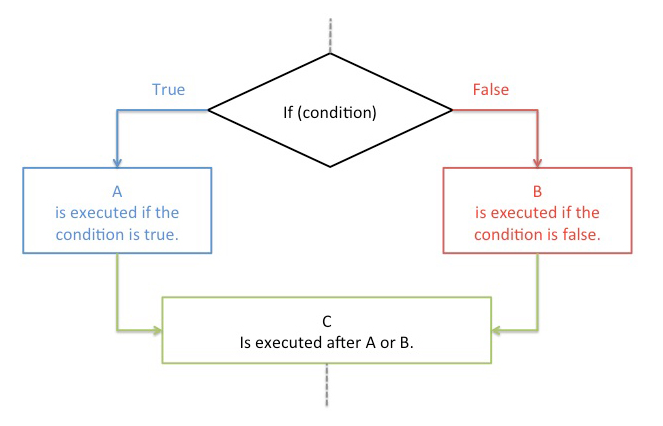
Let’s skip the jargon. Conditional logic is when your form adapts based on what a user selects. It makes your form smarter and help you win the conversion game.
How? Here’s another example…
Imagine you’re at a coffee shop. You ask for a hot cappuccino. The barista nods… and then asks:
“Would you like ice with that?”
You’d probably give them the look, right? That’s exactly how users feel when forms ask irrelevant questions. With conditional logic, your form behaves more like that intuitive barista who already knows not to ask about ice when you said “hot.” They don’t repel customers and act like they know your preference well. If this doesn’t win you the conversion game, what will?
Forms that use this smart logic to eliminate irrelevant questions are often called interactive or smart forms. Which ones are not smart then? The regular ones that act like the first barista asking questions regardless of your choices.
Regular Forms vs. Smart Forms with Conditional Logic
A quick comparison between regular forms and smart forms with conditional logic will help you understand the contrast between the two. If they don’t seem crystal clear, you may need to start creating forms yourself to understand practically.
| Feature | Regular Forms | Smart Forms with Conditional Logic |
|---|---|---|
| Number of Questions | Same for everyone | Changes based on user input |
| User Experience | Often feels irrelevant or lengthy | Personalized and faster |
| Time to complete | Longer | Relatively Shorter |
| Response Quality | Mixed quality | High-quality, targeted data |
| Response rate | Drops due to irrelevant questions | Improves due to personalized questions |
| Abandonment rate | Typically Higher | Lower than regular forms |
| Conversion rate | Tends to drop off | Often sees a healthy lift |
The summary is; Forms without logic are one-size-fits-all. Forms with conditional logic are like having a one-on-one conversation to make people feel understood.
Why Conditional Logic Isn’t Just ‘Nice to Have’ Anymore
We’re all moving faster online. If your form takes more than 20–30 seconds to complete, you’ve already lost people. And here’s the big one: your conversion rate depends heavily on the experience your form delivers.
Here’s what conditional logic gives you:
- Cleaner UX → People see only what matters to them.
- Higher completion rates → Fewer distractions mean more sign-ups.
- Better data → You don’t have to wade through irrelevant info.
- Lower bounce rate → Users stick around and engage longer.
Google also loves websites that offer smooth, relevant user journeys. That’s an indirect SEO win right there.
When to Use Conditional Logic in Forms?
Many marketer, website admin and developer wonder, when they need to put the conditional logic in their forms? The answer is, almost anytime you’re asking more than a handful of questions. A few obvious use cases can be explained below:
- Job application forms: While asking screening questions, set conditional logic on experience level. If the applicant chooses experience level as fresher/freshmen, they should not be asked about previous company name or years of experience. Only ask experience-related questions if the applicant chooses experienced/expert/manager type options.
- Lead Generation Form → Scrap old style contact info questionnaire and filter your potential customer’s contact preference by first asking how they want to reach you; via email or call. Set an intuitive meeting scheduling link to further empower them to pick their own schedule.
- Customer onboarding → When your customer fills up the company size as 0-1 or 1-9 person company, do refrain from asking questions that apply to big corporations only. Design your question sequence in a way that demonstrates fewer questions and takes them directly to where the action happens.
- Request Quote Form: Requesting for a quote forms can be personalized if users are asked about their service details. For example, requesting price proposals for a website development can be short and vague or it can be detailed with conditional logic such as “budget range”, “number of pages”, “preferred technology” etc. Following questions will help the user understand that they can expect for their budget.
- Event signups → Like our first example, show travel questions only to in-person attendees. If the participant is choosing to attend online, take them to further pages where they can finalize registration and get the Zoom link or online attendance instructions.
More Uses of Conditional Logic in Forms
Conditional logic can be used in forms in many other ways. We suggest you identify use cases of your forms and they decide where you can use conditional logic to improve your user experience. Below are some common use case where conditional logic can boost completion rate and enhance data quality.
- Appointment Booking Form: Use a date and time picker, then display data based on availability.
- University Application Form: Take residency information first to know if they need any visa sponsership.
- Job Application Form: If the role is on-site, filter employees location to ensure that they are capable of commuting to the location before prompting for further data.
- Calculation Form: It’s an obvious case of using conditional logic where the output is dependant on users’ input. For example, for a EMI calculator, users must input total capital, number of months and interest rate before the monthly EMI amount displays.
- Product order forms → Only ask attributes like size, and color for products that come with such attributes. For digital goods, do not display or ask for shipping info.
- Vehicle Rental Form: Ask for number of passengers so that you can eliminate too large or too small transportation options from results.
- Product Payment Form: Add options like “Same as Billing Address” to hide separate address fields for billing and shipping.
It’s not only about making forms shorter but also about making them smarter. If you empower a potential customer by asking their preferred contact media, their trust on you will increase. If you allow customers to onboard quickly by displaying only right questions, it will make them more comfortable with your offered service and influence retention. Bottom line is, it will help you win conversion game.

Benefits of Using Conditional Logic in Forms
Using conditional logic in forms brings a wide range of benefits that can drastically improve both user experience and your business outcomes. Here’s a breakdown of the key benefits:
- Enhances User Experience (UX) by avoiding irrelevant questions.
- Boosts form completion rate by personalizing questions.
- Saves time for both users in submission as well as creators in filtering.
- Increases revenue potential by improving lead quality and right customer segmentation.
- Improves data quality by collecting only what are required.
- Enables smart automation and routing to other integration systems.
- Reduces user friction by avoiding unnecessary questions.
- Helps with segmenting, scoring, or qualifying leads more efficiently.
- Allows progressive disclosure of questions in steps based on answers.
- Ensures unbiased response by keeping next questions hidden. (ideal for surveys)
- Automates quote generation and show real-time conditional pricing based on user input.
- Streamlines customer experience by displaying contact info of respective department based on user input.
- Influences customer advocacy aka referrals resulting in saving marketing budgets elsewhere.
The benefits of using conditional logic in forms are plenty and all of them somehow impacts the business growth and sustainability. It all comes down to designing a form that is ideal for the right audience. To do it perfectly, you need to use a form builder that is close to perfection. If you are using WordPress for your site builder, one of the many smart options you have is FormGent.
You Don’t Need to Be a Developer
FormGent is an exciting WordPress form plugin that enabled building forms with conditional logic dead simple. You don’t need any coding skill or be a developer to design forms with conditional logic. Just the simple drag-and-drop builder is enough to accomplish your desired form creation. Just common-sense rules built into a clean interface.
People today expect personalized digital experiences – your form shouldn’t be the exception.
Smart forms with conditional logic don’t just improve user experience, they increase conversions, save time, and make your data cleaner.
The bottom line? Treat every form like a conversation, not an interrogation. When you ask only what matters, people are more likely to respond.

S. M. Navid Anjum
Digital Marketing enthusiast who loves to write technical reviews and trendy contents. Currently working with WordPress Plugin Marketing and growth. Open to collaboration and co-marketing opportunities with any SaaS and plugins.

How to Add a File Upload Field to a WordPress Form (Free)
August 24, 2026[…] this if the visitor selected ‘international applicant’ earlier”) and click Apply. Read more on conditional logic if you want to see more use […]