
How To Create Conversational Forms On Your WordPress Website
-
- Tips and Tricks
- 11 mins read
Fed up with traditional, clunky forms that users left halfway?
Conversational forms are here to change the game!
The modern, smooth and engaging way to collect leads, feedback with human chat-like interactions. This boosts engagement and completion rates up to 90% on your WordPress site.
In this blog, you’ll walk away with successful actionable steps to enhance conversational form that feels more like a real conversation than a traditional survey. Whether you’re a business owner, marketer or developer, you’ll find more effective hacks to collect more data. And definitely without writing any code at all.
Ah! Missing AI? Don’t worry. We’ll cover it. Let’s stick!
What is the Conversational Form?
Conversational forms are an interactive user-friendly type of online form. It guides users through questions one at a time just like a real conversation. Instead of a long list of fields, this approach creates a friendly, focused experience. This makes the user feel more like chatting than filling out a form.
The result? Higher engagement, fewer drop-offs, and significantly improved conversion rates.
Why It Works (Backed by Data)
Conversational landing pages have a 320% higher conversion rate compared to traditional landing pages (Source: Outset Business)
Studies comparing interactive question-by-question formats with traditional static forms report conversion increases ranging up to 86% (Source: VWO)
Mobile Users Prefer Chat-Based Interactions. Over 70% of consumers prefer quick, chat-style interactions—resulting in a 30% boost in conversions when conversational formats are used (Source: Vanchat)
What Makes a Conversational Form Different from a Traditional Form?
Conversational forms differ from traditional forms in how they present and collect information. Conversational forms stand out by creating a chat-like experience, asking one question at a time, which improves focus and increases form completion rates. In contrast, traditional forms present all fields at once, often overwhelming users and leading to higher bounce rate.
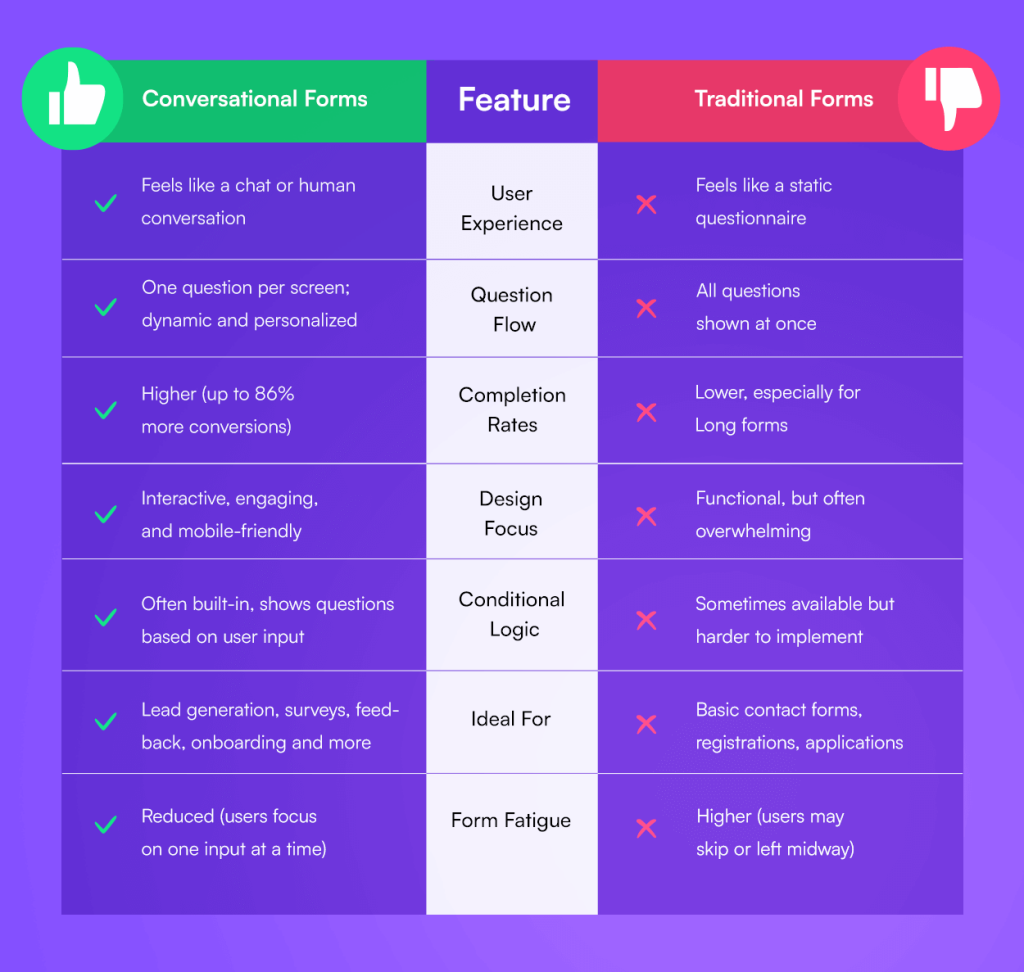
Here’s a summary of how they differ:
Conversational Forms offer a chat-like, dynamic experience with one question per screen, making them more engaging, mobile-friendly, and personalized. They typically result in higher completion rates (up to 86% more conversions) and reduce form fatigue. These forms are ideal for lead generation, surveys, feedback, and onboarding, often featuring built-in conditional logic.
In contrast, Traditional Forms present all questions at once like a static questionnaire. While functional for basic contact forms or applications, they can feel overwhelming, are less interactive, and tend to have lower completion rates, especially on longer forms. Conditional logic is sometimes available but harder to implement.
Why Conversational Forms Make Sense for WordPress
Making a new decision is always confusing. You also might be thinking about changing your traditional forms. That’s why we’re clarifying to you the benefits of Conversational Forms. Before checking out the benefits spare a minute to check what expertise says about Conversational Forms:
Conversational forms are not just a UX trend—they’re a shift in how people interact with brands online. If you want more completions, better data, and happier users, start using conversational forms today.
— Talia Wolf, Founder, GetUplift (CRO & UX Expert)
We saw a 60% increase in lead capture after switching to a conversational format. It felt more like a dialogue, and users responded better.
— Sam Hurley, Founder, OPTIM-EYEZ
In a nutshell, conversational forms offer higher user engagement, better data quality, and improved mobile experience by asking one question at a time in a chat-style format. Ideal for reducing bounce rates and increasing conversions. Let’s break it down point by point:
1. Dramatically Higher Conversion Rates
Conversational forms feel more human. And when people feel at ease, they’re more likely to complete the form—leading to more leads, signups, or feedback.
When users are guided step-by-step through a form, they’re more likely to finish it. Conversational web forms break down complex inputs into manageable steps, minimizing bounce rate.
2. Enhanced User Experience (UX)
The step-by-step nature reduces stress. Instead of overwhelming users, you gently guide them through.
Conversational forms feel personal, not transactional. By blending a real conversation, they turn form filling into a smoother and more enjoyable process.
3. Mobile-Friendly by Nature
Since users only see one field at a time, conversational forms are inherently mobile-friendly—perfect for on-the-go audiences.
All questions are displayed one at a time in conversational forms that fit beautifully on all screen sizes, especially smartphones—eliminating zooming, scrolling, or pinching.
4. Cleaner Data Collection
With conditional logic, you can show only relevant questions based on previous answers, ensuring cleaner and more relevant data.
5. Increased Personalization
Using smart conditional logic, you can show relevant questions based on user responses. This personalizes forms and removes any irrelevant or unnecessary fields.
More Benefits of Conversational Forms You Should Know
6. Better Data Quality
Fewer skipped questions, cleaner input formatting, and guided responses mean higher-quality data. You’ll get more accurate information without overwhelming users.
7. Builds Trust and Reduces Anxiety
The friendly tone of conversational forms lowers psychological resistance. Users feel more comfortable sharing information when they’re not staring at a long, static form.
8. Boosts Brand Personality and Trust
Conversational forms give you the opportunity to showcase your brand’s voice in a more human, relatable way. By replacing cold, static forms with friendly, chat-like interactions, you build trust, make your brand feel approachable, and leave a positive first impression—especially crucial for first-time visitors and cold leads.
9. Encourages Storytelling
Unlike traditional forms, conversational layouts can invite users to share more detailed answers, which is perfect for testimonials, applications, and onboarding.
10. Easy to A/B Test
You can easily test multiple conversational flows or question orders to optimize for conversions, thanks to the modular format of these forms.
Types of Conversational Form: Use Cases Where Conversational Forms Shine
The use cases of Conversational Forms are unlimited. From startup to giant business, Conversational Forms works seamlessly on every platform.
Conversational forms are ideal for lead generation, feedback collection, job applications, booking services, ecommerce recommendations, and more. With a bunch of offerings, conversational forms are rich in personalized, high-converting alternatives to traditional forms. The options are unlimited, we’re mentioning some popular options:
1. Lead Generation Forms
Engage visitors with an interactive form that collects contact details while qualifying leads based on answers. Great for landing pages and digital marketing campaigns.
2. Customer Feedback & Satisfaction Surveys
Turn boring surveys into engaging conversations to gather user feedback, product insights, or customer satisfaction ratings. This converts higher response rates, more authentic answers.
3. Quizzes & Personality Tests
Build interactive quizzes for fun, education, or lead magnets. Each question flows like a chat, making it more engaging and shareable.
4. Service Booking or Appointment Scheduling
Guide users through scheduling a service—like a doctor visit, consultation, or salon appointment—with dynamic date, time, and preference fields. Helps to reduce back-and-forth emails.
5. Job Applications
Make applying for jobs less intimidating. Ask questions in a conversational format to gather applicant details, portfolio links, and qualifications step by step.
6. Onboarding Forms
Simplify user or client onboarding with forms that gather preferences, goals, and initial setup info through a guided process. Ideal for SaaS, agencies, and online coaching businesses.
7. Event Registration
Register attendees through a personalized chat-style form. You can use conditional logic to offer different tracks or pricing tiers. The Use cases can be conferences, webinars, meetups or more.
8. Newsletter or Content Subscriptions
Replace boring email capture forms with a short, engaging interaction that collects user interests and email preferences.
9. Customer Support & Help Requests
Let users submit support tickets or help requests in a more natural way, guiding them to the right department or resource. Use logic to auto-suggest answers based on keywords.
10. Quote or Price Estimation Tools
Create a step-by-step quote form to help users get custom pricing based on what they need. Common for freelancers, web designers, real estate agents, insurance, etc.
11. Donations & Fundraising
Encourage donations by walking donors through their motivation, donation amount, and cause preferences with a friendly conversational tone. Used by NGOs, charities, religious orgs, crowdfunding platforms.
12. Course Enrollment or Educational Surveys
Guide students through course signup or ask questions to understand their learning needs. Great for online academies, coaching programs, e-learning platforms.
13. Legal or Compliance Disclaimers
Instead of making users read and accept long legal texts, conversational forms can explain and confirm terms in a friendly, step-by-step manner.
14. Health Assessments & Fitness Planners
Collect lifestyle or health data through interactive forms to create personalized plans, recommendations, or initial consultations. Used by gyms, nutritionists, telemedicine, wellness coaches.
How to Create a Conversational Form on WordPress (Step-by-Step)
You’ll find lots of Conversational Form plugins available on WordPress. To make the process easy and code-free, we’ll use the plugin called FormGent. The reason why we’re choosing FormGent is because it’s providing lots of features for free. Including AI-powered WordPress forms builder that supports conversational and multi-step forms natively.
Get Started with FormGent Now!
Why Use FormGent for Conversational Forms?
FormGent isn’t just another form builder—it’s a next-gen tool built for speed, simplicity, and engagement. Here’s what sets it apart:
· Free AI-powered form generation
· Drag-and-drop interface (no code!)
· Responsive & mobile-first design
· Conditional Logic for smarter forms
· Standalone form links & iframe embed
· Upcoming features like payments, quizzes & more
Let’s create your awesome conversational form.
Step 1: How to Install the FormGent Plugin
i. Go to your WordPress Dashboard

ii. Navigate to Plugins → Add New

iii. Search for FormGent

iv. Click Install Now and then Activate. FromGent has also paid subscription. To get more features and user analytics, you can purchase the subscription from Formgent Official Website.


Step 2: Create a New Conversational Form
i. From the sidebar, go to FormGent → Create New


You can
- start from scratch or
- create with AI.
As the AI feature is very smart, you can simply build your form with a prompt using it. This is fast, smart and time saving. We will preview both options for your assistance.
How To Create AI Conversational Form
Let’s start with AI.
i. Choose “Create with AI.”

ii. Select Form Type: AI Conversational Form

iii. Describe your Form’s’ purpose in 500 characters in the prompt section. You can also use the suggestions. But we strongly suggest using descriptive prompts for getting the best output.

iv. As we’re making demo forms. We’re just using the prompt from the suggestions box. Let’s see how it works!

v. After clicking the “Generate Form” options, please wait for a while as AI prepare the form for you.

vi. Wow! Let’s see the magic. You have just created an amazing conversational form with just a few clicks! You can modify the sections as per your preference and use it.
Step 3: Publish and share

i. After personalization, click the publish button and your form will go live.

ii. Congratulations. You have successfully published your new AI conversational form. You can also copy the link to share directly (great for email or social!), or use the shortcode to embed it on your site.
Some core features like blocks, patterns, media, logic are the same in both manual form and AI version. Thus, we mentioned the topic once.

How To Create a Conversational Form From the Scratch
i. Choose “Start from Scratch”

ii. Choose Conversational Form as your form type

iii. Use the drag-and-drop interface to add required fields like:
- Name
- Multiple Choice
- Dropdown
- File Upload
- Page Breaks for steps
Bonus: FormGent uses AI-powered suggestions to help you structure your form smarter and faster.

iv. Add Personalization & Logic (Optional)
You can build a smart form with Conditional Logic. You can display questions based on prior answers and hide irrelevant fields to streamline the flow. Tailor your follow-up questions dynamically to keep the form experience short, sharp, and user-relevant.

V. Customize the Look & Feel
FormGent lets you add welcome and thank you screens. You can change button texts, adjust colors, fonts, and layout. To make your form match your brand, you don’t need to write any CSS code. The customization features can add more functionality and improve the interface.

Vi. Publish Your Conversational Form
Once the form is prepared, you can publish the structure. You can also copy the link to share directly (great for email or social!), or use the shortcode to embed it on your site.

Vii. Optimize with Insights (Built-in Analytics)
One of the best parts about FormGent? You get real-time form analytics. Track drop-off points, completion rates, most/least engaged fields and more data. This helps you iterate and improve your form performance over time.

Final Thoughts About Conversational Forms In WordPress
In a world where attention spans are short, conversational forms help you connect faster and more effectively. They’re simple to create, fun to use, and powerful in results. They enable you to collect data while making a real conversation.
If you’re serious about improving your user experience and boosting conversions, conversational forms are a no-brainer—and FormGent makes it unbelievably easy.
Ready to build your first conversational form? Download FormGent today and see the difference for yourself.
Have questions? Want to see FormGent in action? Join our Facebook community or reach out to support — we’re here to help!
Get Started with FormGent Now!
Some Facts You Should Know About Conversational Forms
1. What is a conversational form, and why should I use one on my WordPress site?
Conversational forms are interactive, chat-like forms that present one question at a time—just like a real conversation. This friendly format reduces overwhelm, keeps users focused, and often leads to higher completion and conversion rates. If you want better engagement and fewer abandoned forms, conversational forms are a smart choice.
2. How are conversational forms different from traditional contact forms?
Unlike traditional forms that show all fields at once, conversational forms ask one question at a time in a flow that feels more human. This improves usability, especially on mobile devices, and helps users feel less overwhelmed—ultimately boosting form completion rates.
3. Are conversational forms mobile-responsive?
Yes, conversational forms are inherently mobile-friendly. FormGent conversational forms designed to adapt smoothly to different screen sizes and devices, offering a clean, focused user experience on smartphones, tablets, and desktops—without any manual adjustments.
4. Can I use conditional logic in conversational forms?
Yes! Smart conditional logic is one of the biggest strengths of conversational forms. You can dynamically show or hide questions based on previous answers, allowing you to personalize each user’s journey through the form and collect only the data that’s relevant.
5. Do conversational forms support multi-page formats or page breaks?
Technically, conversational forms don’t need page breaks. Since they already break content into one question per step, the format functions like a multi-step form by design. This ensures better user focus and eliminates the need for traditional pagination.
6. Can I embed conversational forms anywhere on my site?
Yes. Conversational forms can be embedded using shortcodes, blocks (if you’re using the block editor), or even as standalone forms via shareable links or popups.
7. Are conversational forms secure and GDPR-compliant?
Yes, especially if you’re using a plugin like FormGent. Most reputable form builders support GDPR compliance, offer captcha/spam protection, and include consent fields to ensure data privacy and security for your users.
8. Can I track analytics for conversational form performance?
Yes. Many form builders like FormGent now include built-in analytics to monitor form performance. This helps you see completion rates, drop-off points, and optimize your forms for better conversions.
9. What types of websites should use conversational contact forms?
Conversational forms are ideal for websites focused on lead generation, service booking, surveys, feedback, onboarding, and customer support. Whether you run a blog, agency, SaaS product, nonprofit, or eCommerce store—conversational forms can improve the user experience.
10. Can I customize the design and tone of my conversational form?
Yes. Most conversational form tools let you customize fonts, colors, branding, and even conversational tone (like adding emojis or friendly messages). This helps your form feel like a natural extension of your brand voice.

Rezaul Karim
Rezaul Karim is a passionate Digital Marketer driven by curiosity and creativity in the ever-evolving world of online marketing. With over 6 years of hands-on experience in Content Writing, Copywriting, SEO, and Social Media Marketing, he brings a strategic edge to crafting content that engages and converts. Always eager to explore new trends and tools, Rezaul thrives on finding smarter ways to connect brands with their audiences. Outside of work, he enjoys diving into books or recharging in nature.


Leave a Reply