
How FormGent Redefines Conversational Forms in WordPress for Free
-
- Form Builder
- 9 mins read

Conversational forms are not entirely new innovation but over the years, the option has only grown popular. According to heyflow, their users increased lead capturing by 54% using interactive forms. That’s why so many WordPress site owners are also switching to conversational form builders.
But there’s a problem.
Most conversational form plugins are not free and buying a subscription just to test a format can be costly. Many small and medium businesses do not want to spend this on A/B testing to see results and stick to traditional forms instead.
Today we’re about to discuss a potential solution; a WordPress form plugin that offers conversational form building entirely free. It’s none other than FormGent – our AI-powered form builder that made all advanced features available in it’s free plan. However, one of it’s core strength is the conversational form.
In this article, I am going to show you how FormGent’s free conversational form feature can elevate your lead generation, data capturing and customer support game strong. So without further delay, let’s jump in.
Latest Article: FormGent v1.6 Overview: Everything We’ve Built Since Launch
Redefining Forms with Conversational Flow
Smart businesses don’t keep users hooked. They value customer’s time and effort and make things easier for them. This is why submitting a service or quote request, asking for support or after sales services via forms shouldn’t be boring and time consuming.
Conversational forms were invented to reduce that pain. Asking the same information in an interactive way so that they feel like they’re not filling out a form rather engaging in a conversation with you. The whole point is to make form submission engaging, reducing drop-off and hide next questions from plain sight.
Now you might be asking how FormGent makes it differently. Today I am going to present exactly that contrast. How FormGent gives you a better conversational form experience without spending any money. Stay tuned as we will jump into the WordPress form plugin landscape, discuss which players do what and how FormGent is upscaling conversational form experience for users.
Conversational Forms in WordPress Form Plugins – a Game changing feature

Almost all advanced form builder plugin in the WordPress ecosystem now offers conversation style forms. Whether it requires a pro subscription or a different add-on, the feature is there. If you are familiar with WordPress form plugins, you may have used this feature already. What FormGent do exceptionally is keeping this feature open for everyone – no pro plan required.
Not only that. It gives you a while different experience with insights, integrations and other functionalities. If you are curious how FormGent gives a different experience of conversational forms to users, check out the below contrast. This should clear your concerns, you are free to try yourself.
Conversational Forms with Limited Fields – Deal Breaker
I checked Fluent Forms free plan, one of the most popular in WordPress right now. Honestly I am impressed by it’s capabilities. It’s so smooth and offers so many fields. Yet, their conversational forms are limited in free plan. I could not use a simple field like phone number or advanced fields like file upload, CAPTCHA etc essential fields any forms may require.
These fields are locked in the pro plan. Fair to say Fluent Forms gave the users access to create conversational forms for free – which is great. It would be totally game changer if they allowed more such as quiz scoring or integrations alongside too.
FormGent has literally no lock on fields and allow users to integrate forms with CAPTCHA solutions for security. You can also integrate your forms to automation solutions like Zapier, store data in Google Sheets or ZohoCRM with seamless integration, pass your responses to MailChimp for email sequences. Overall, it’s not binding you in any way when it comes to conversational form.
Conversational Forms Locked in Freemium – Not for Everyone
Formidable Forms is another popular form builder that has extra-ordinary features and a massive user base. It’s built with powerful form fields and extra ordinary advantages but just like most WordPress form plugins, it’s interactive form features are locked inside the Pro. Starting out with this plugin is great but when you need an exciting feature like conversational form templates, you need to upgrade plans.
SureForms has made form building on WordPress’s native builder popular but do you know what it’s free plan is missing? You guessed it right – conversational layout. When you start building form with SureForms, things look perfect the way you expect it to be. But right when you click the conversational sytle, if prompts you to upgrade plan.
FormGent was built to fix this exact issue. Hidden limits hurt conversions and momentum, and FormGent is built different. If you want conversational forms with all features unlocked and to use it flexibly on your site instead of holding you back, I am going to show you what to look for and what to avoid.
Many Still Missing Conversational Forms – The Duct-taping Solution

Forminator is great – lets you create so many forms on free plan. But it’s not adapted to the conversational style UX yet. Meaning you are basically using half solution and relying on another plugin or external tool for this valuable feature. Although one may argue that Forminator is built different. They prefer duct taping multiple plugins to do one task – information collection.
Ninja Forms also offers many features and Pro Add-ons but I was unable to find it’s conversational form feature. I am sure they have plans to bring this soon but the feature will not come at no cost. They will probably offer is as another pro add-on so that users get trapped into another recurring subscription. Without it, you’re going to be using another partial solution by paying full subscription.
The goal of FormGent was straight from the beginning – making form building simple the way it should be. And this is the psychology behind keeping a highly valuable feature like conversational form building open for all in the free plan.
Is FormGent truly redefining Conversational Forms in WordPress?

Interactive conversation style forms are no longer a premium feature especially to WordPress users. Many plugins before FormGent offered it in limited form to it’s users base. What FormGent did differently is giving it a full functional capacity so that anyone can create anything with it – embodying the true community-focused spirit of WordPress.
Let’s take a look at the advantages FormGent’s conversational form feature offers and why it can be called a redefining moment:
- All fields access including file upload, date and time picker, rating scale
- Styling and Personalizing with Full freedom
- Adding relevant media to make forms more engaging
- Quiz and Payment Feature
- Form Submission Analytics and Export feature
- Integration with Google Sheet, MailChimp or Zapier
- iFrame Embed – launch forms outside WordPress
- Instant sharing with URL
And if you get a pro subscription, you’ll get additionally:
- Save Incomplete Data (Useful for marketing and lead generation)
- Connect forms to any tools using Webhooks (automate your workflow)
- User CPT submission
However, you don’t need a pro subscription – yet. The Free plugin itself is a game changer in building conversational form that improves your engagement, completion and conversion. So why are you hesitating? Let’s jump into some details of FormGent’s conversational Form builder features and why should you try it.
FormGent Conversational Form at a Glance
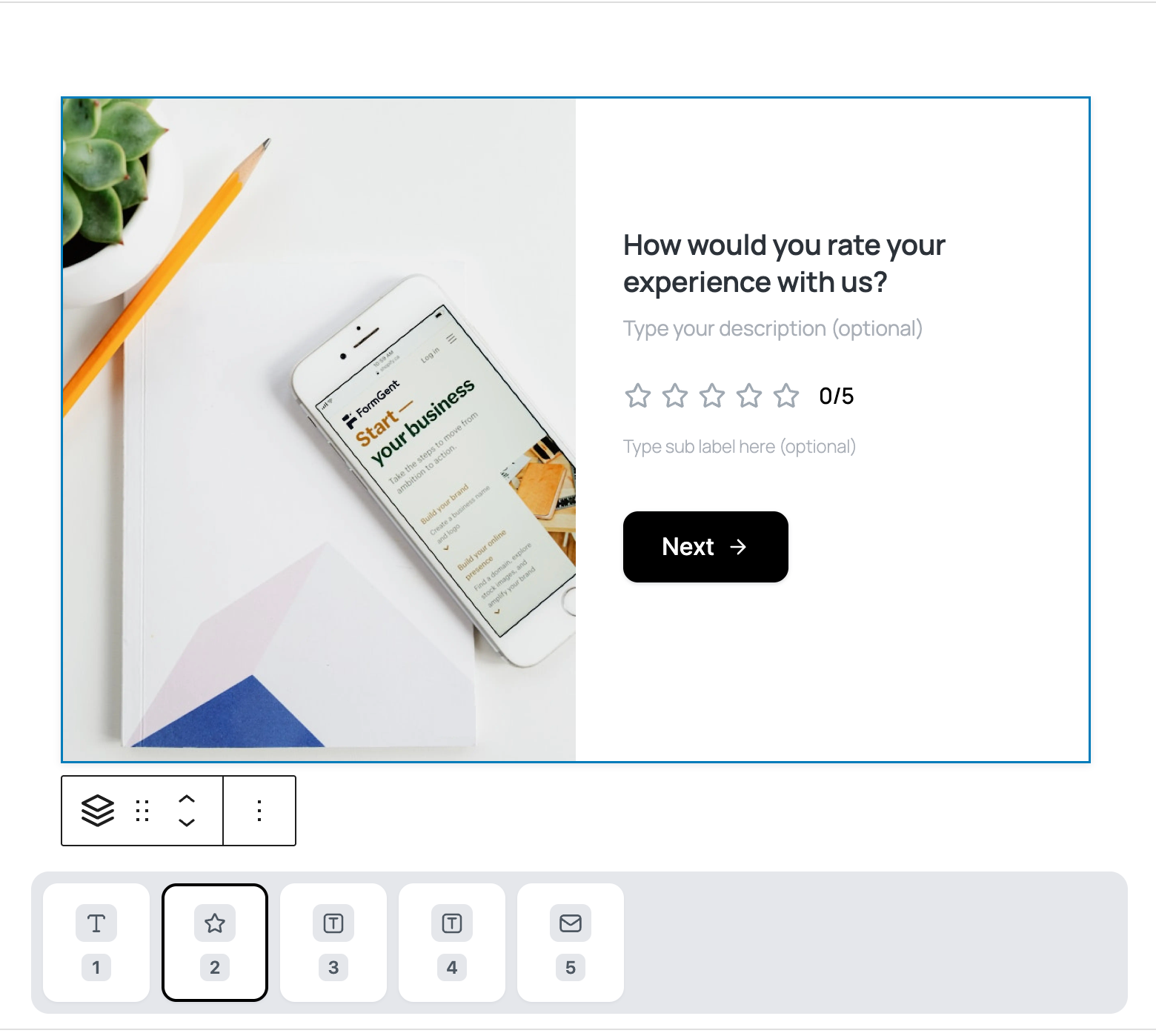
If you are curious how the panel looks like – this is it. The form builder is WordPress-native meaning the blocks are familiar to all WordPress users. It comes with 30 form fields – all available in free plan. Users can build any sort of forms including the payment, quiz, appointment booking in conversational style.
Some of the most exclusive fields include:
- File Upload
- Date and Time Picker
- Range Slider
- Captcha
- Rating Scale
- HTML
- Google Maps
Form Styling Matters Just as Much

The aesthetics of the form also demands discussion. When I tried Fluent Forms, I found a very minimal and clean user interface but it lacked one thing – media. Users often want to understand the question from visual aid rather than reading out boring texts.
SureForms also keeps advanced styling locked in Pro plan. That means you cannot design your forms the way you want without buying a subscription. This is where FormGent’s conversational UI plays big role. You can also discard media if you want as it comes with flexible layout options.
Create Interactive Quiz and Checkout Forms – conversation style

Want to engage your audience with quizzes? FormGent offers conversation style quiz building plus grading or scoring. Go to your form setting from the right panel, enable quiz and set your grade or scores. Display quiz result after submitting answers – one at a time without revealing next question. You can also enable or disable skip button for users.
You can also turn your form into shopping checkout using PayPal and Stripe integration – all for free. Generally these forms are very common in classic style forms. Even some stores utilize multi-step forms but FormGent takes e-commerce checkout to a whole new level. You can display each step in one screen like this:
- Payment Items (Products fetched from your WooCommerce checkout)
- Quantity
- Payment Gateway (PayPal or Stripe)
- Custom Payment Amount (Optional)
- Payment Summary
The bottom line is – your customer experience will be exceptional with FormGent conversation style checkout.
Keep Partial Submissions – Grow Your Lead List
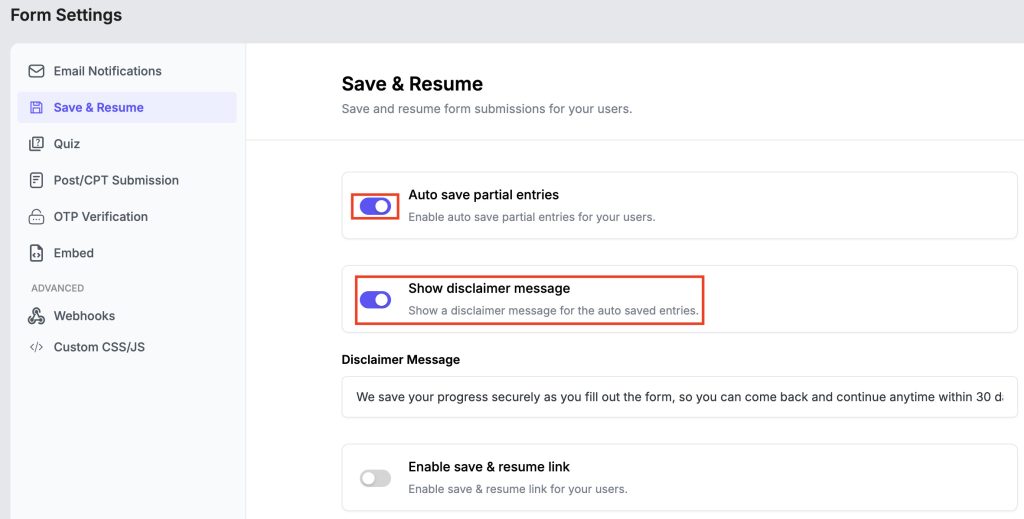
Things get a bit interesting here – you can now use FormGent for your lead generation form design and get more leads than other solutions. How?
FormGent stores incomplete data of all forms meaning anyone who hasn’t attempted to submit their leads may have dropped partial information that you can utilize. One of the most practical use case is quote requests or eCommerce checkout where someone got distracted in the midst and you can send reminder emails to convert them later.
This is a Pro feature meaning free version will not enable it. But if you wish to get an excellent lead generation solution that comes with lead form templates, you can get a pro access for below 50 bucks a year.
Make Forms Accessible Anywhere – Launch Outside WordPress
FormGent offers multiple share options that lets you launch forms both within and outside WordPress. Not only you can publish and position forms within WordPress but also you can send forms using URL or embed using iFrames in any website or platform – be that WordPress, custom or any other.
The feature also works with interactive forms. You can launch the forms from form setting using the Embed setting. Simply copy your forms embed code and insert it in the destination page using iFrame.
See Your Submissions with Charts and Export the Way You Like
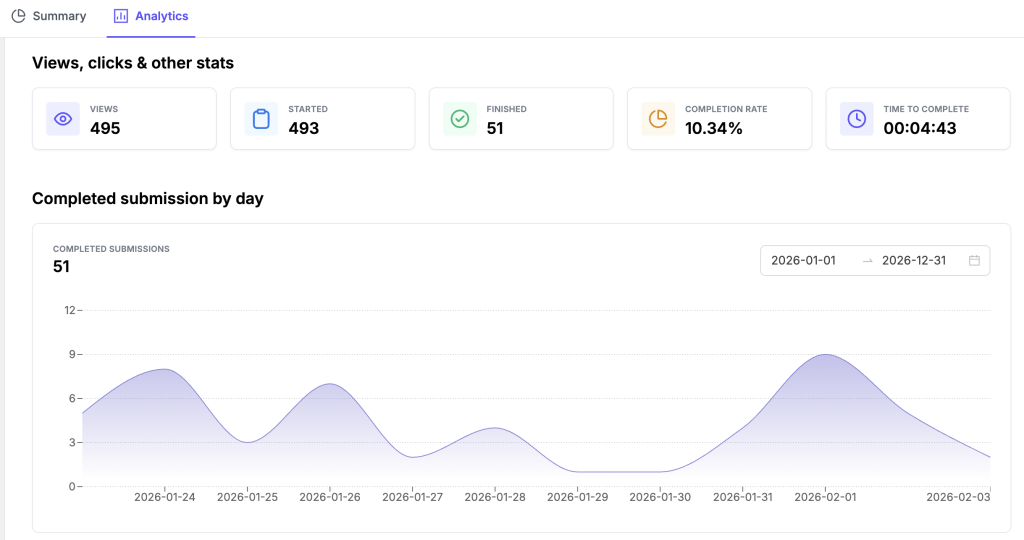
Your form data is yours and no solution should keep it locked from you. Tragically many leading WordPress form plugins only let you receive submissions over email but doesn’t allow bulk data import/export or even see in tabular form without a pro subscription. FormGent is always against this tide – you can see, export your data even with visual charts.
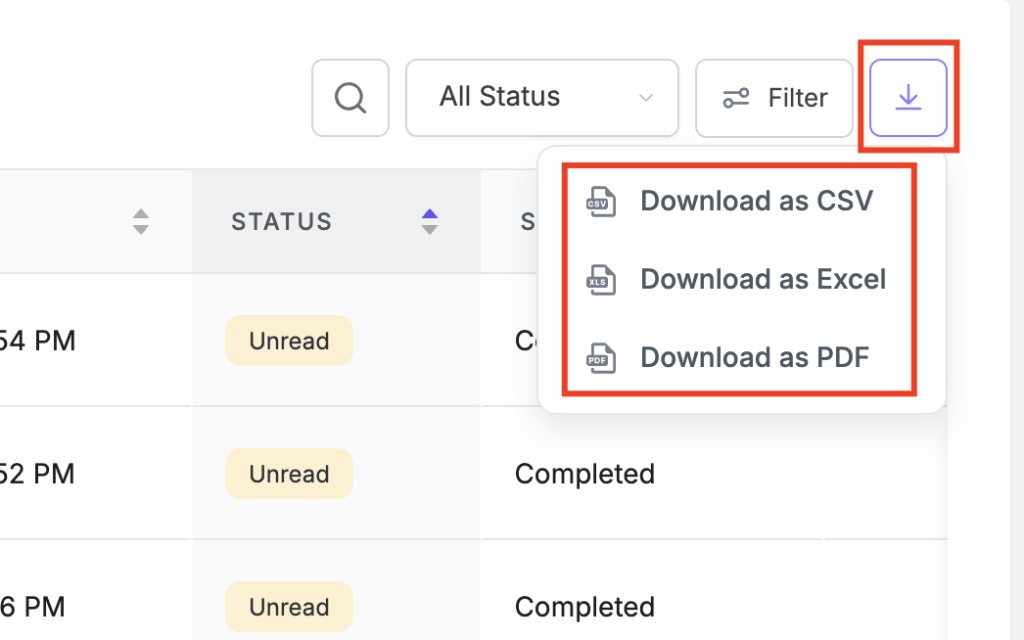
The export format available are:
- CSV
- XLS
By exporting, developers can present the responses to clients, marketers can present them to board of directors and small or medium entrepreneurs can make educated decisions by analyzing leads. All available within the interactive form so that you can see what users say in each step.
Try FormGent – Don’t Pay for Conversational Form Ever Again
Try FormGent – if you haven’t it. Give our conversation style for a try. Create whatever you want with it and integrate with any solutions you’re using right now. Do let us know how it feels.
If you’re having doubts, drop by our WordPress repository to see what existing users are saying. We are sure you’ll love this.
Want to see what else the plugin has got? Visit our features page – we’re offering a lot more than just a conversational UI. We’re giving away a pro tool for free. In exchange, all we want is your feedback. So do let us know how we can improve further.


Leave a Reply