

5 Best Online Form Builders For Event Registrations
-
- WordPress Plugins
- 9 mins read

Did you know that 27% of people quit filling out a form because it’s too long, and 10% leave because of unnecessary questions? That means you could lose a big chunk of potential event attendees just because the process feels frustrating. What if you made it simpler and kept more people signing up?
Whether you’re hosting a conference, a webinar, or a local workshop, event registration is your first chance to impress attendees. A cluttered or complicated form can create frustration, while a seamless, easy-to-use solution leaves a lasting positive impression.
This is where online form builders come in. With intuitive designs, robust features, and customization options, they transform event registrations into a hassle-free experience. They’re not just tools—they’re the secret weapon to make your events shine from the beginning.
In this blog post, we’ll review the five best online form builders for event registrations that make it smooth, professional, and engaging. Ready to simplify your next event?
Let’s dive in!
Why Use Online Form Builders for Event Registrations?
Event organizers now rely heavily on online form builders since they provide numerous benefits that simplify both registration processes while boosting event management effectiveness. Here’s how they can benefit your event planning.
i. Simplifies attendee management
The automation features of online form builders for event registrations eliminate both manual errors and the need for manual data entry, thus shortening the process times.
Through automated techniques, organizers can handle participant details more effectively alongside registration tracking and report generation to achieve a successful event.
ii. Provides customization options for branding
Online form builders let organizers select from different template formats like real estate agents and property listings, surveys, event registrations, etc. They also offer design editing tools to match the form format to their event branding. Using consistent branding on every event material helps create a professional appearance while strengthening the identity that belongs to the event.
iii. Ensures secure data collection and storage
Online form-building platforms maintain secure data collection through encryption methods alongside full adherence to data protection regulations. The secure design of these solutions maintains data privacy protection and attendee trust throughout information gathering.
iv. Improves attendee experience with easy-to-use forms
Modern online form builders for event registrations offer simple, user-friendly designs that make registration quick and hassle-free. When the process is smooth, more attendees complete their sign-up, leading to a better overall experience.
v. Market growth and adoption
The global form builder market is expanding rapidly, as figures show that the market, starting at USD 4.059 billion in 2024, will reach USD 9.476 billion by 2031 at a compound annual growth rate (CAGR) of 11.18%.
Business digitalization and the requirement for efficient data collection methods propel this market expansion. Sophisticated online solutions have evolved for event organizers to use mobile-compatible customizable systems addressing their varied organizational needs.
Online form builders for event registrations present a complete solution that combines deep efficiency with flexible customization features, advanced security measures, and enhanced user interface benefits. These tools have got to be essential for contemporary event management. Hence, people tend to use them to get their jobs done.
Key Features to Look for in an Event Registration Form Builder
Selecting the right online form builders for event registrations can make or break your event’s sign-up process. The ideal tool should simplify registration while offering robust features to meet your needs.
i. Customizable form templates
Look for form builders with flexible templates that match your event’s branding and needs. A well-designed form creates a professional look and ensures a smooth experience for attendees.
ii. Payment integration for ticketed events
For ticketed events, smooth payment processing is a must. Choose a form builder that securely supports popular payment methods, making transactions easy for attendees.
iii. Mobile responsiveness and accessibility
Ensure the form builder provides designs that adapt to various screen sizes because most users now access your content through mobile devices. Users experience better registration rates due to this accessibility feature.
iv. Analytics and reporting capabilities
Web platforms providing robust analytics track registration statistics and expose event attendee engagement levels for continuous planning of future events. The system’s sophisticated reporting capabilities give decision-makers the insights they need to improve event strategies.
v. Email notifications and attendee confirmation
The system sends automatic email messages to notify people after registering and sends additional event updates before the scheduled date. Through this feature, organizers can boost their communication channels and deliver essential details to all attendees.
Comparison Table of Online Form Builders
This table highlights the top online form builders for event registrations, with FormGent leading the list due to its cutting-edge features and flexibility.

The 5 Best Online Form Builders for Event Registrations
Online form builders for event registrations require seamless and user-friendly forms that capture attendee details efficiently. The right online form builder ensures a smooth registration process, helping organizers manage data effortlessly.
1. FormGent
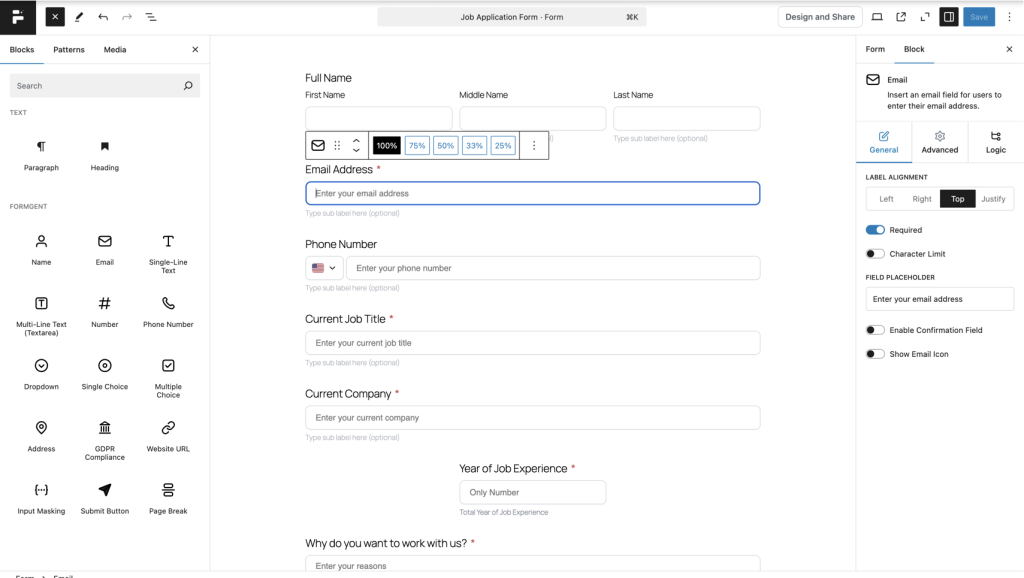
FormGent is a powerful and user-friendly online form builder tailored for event organizers. Designed with simplicity and functionality, it offers a seamless experience for creating, managing, and automating event registration forms.
Most importantly, its scalability ensures that it grows with your event needs, making it ideal for small gatherings and large-scale conferences. FormGent’s modern interface and robust features eliminate the hassle of event registration, enabling you to focus on delivering an exceptional event.
Key features
- Drag-and-Drop Builder: You can design easy forms without writing computer code.
- Advanced Conditional Logic: Your registration process should dynamically adjust forms depending on user selections to deliver customized registration journeys.
- Third-Party Integrations: Event management becomes seamless when you connect your solutions to email marketing tools like Mailchimp, CRM systems, and payment gateways.
- Automation Tools: Automated workflows allow organizations to manage attendee follow-ups and create and send reminders and confirmations.
- AI-Powered Form Suggestions: Your system should produce optimal form templates that match your event requirements and align with audience needs.
- Real-Time Analytics Dashboard: Digital event tracking systems allow you to understand participant actions while delivering vital data analytics.
- Custom Branding: Your event’s brand takes center stage when you apply advanced customization and branding tools to your forms.
- Multi-Step Forms: Your users will experience better registration processes when you divide them into smaller actionable steps.
- Mobile-Responsive Design: Your platform must deliver a unified experience across every device your audience uses.
- Payment Gateways: Secure payment acceptance for ticketed events is possible through form integrations with Stripe and PayPal.
Why it stands out
FormGent combines ease of use with enterprise-level functionality. Its AI-powered suggestions and real-time analytics make it a game-changer for organizers seeking a fantastic solution to optimize their event registrations.
Pricing structure
FormGent offers flexible pricing plans tailored to different needs.
- Free: The free plan includes essential features such as basic form creation and AI suggestions.
- Premium: It starts at $49/year, unlocking premium features like advanced analytics, multi-step forms, integrations, and priority support. For larger businesses or agencies, FormGent also offers enterprise-level pricing options.
2. Everest Forms
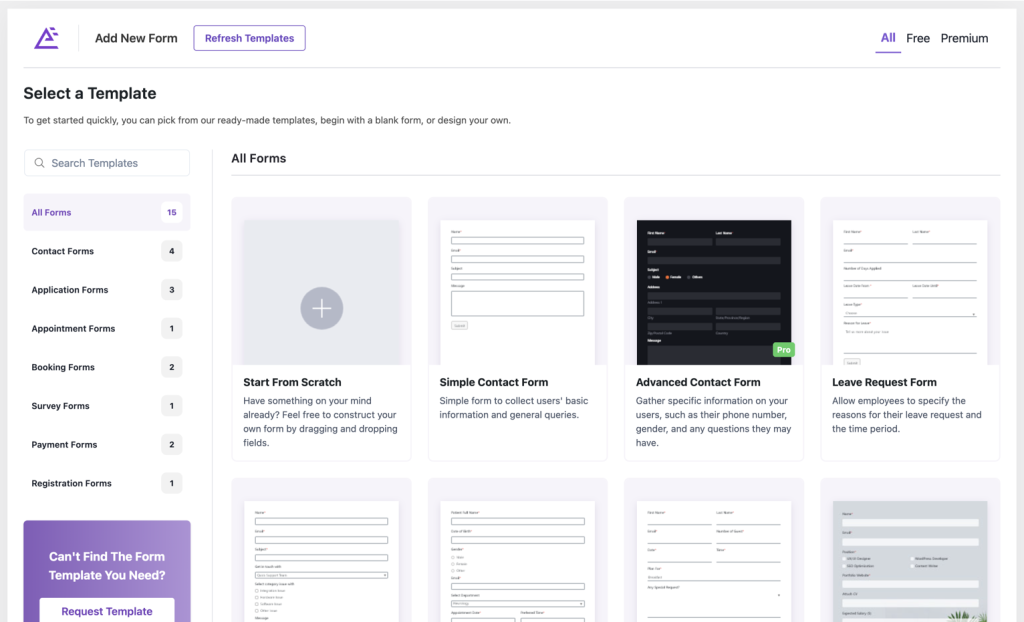
The easy-to-use decision framework of Everest Forms enables small-to-medium events to create versatile digital form solutions. The application redirects time to speed up setup processes by delivering ready-to-use solutions simultaneously supporting one-of-a-kind occasion requirements. Perfect for organizers with limited technical expertise, Everest Forms simplifies the form creation while keeping costs low.
Key features
- Pre-Built Templates: The platform provides multiple professionally designed templates that enable quick setup straight out of the box.
- Multi-Column Layouts: Organized form layouts create superior user interfaces.
- Drag-and-Drop Form Builder: No programming skills are necessary because users have complete control over building and customizing forms.
- Field Validation: The system enables precise data collection through versatile and user-defined input validation parameters.
- Multi-Language Support: Offer service reaches worldwide customers through its language localization process
Why it stands out
Everest Forms is highly cost-effective, making it an ideal choice for organizing smaller budgets. Its focus on simplicity and efficiency ensures a smooth event registration process.
Pricing structure
Everest Forms provides multiple pricing plans to accommodate different user needs:
- Personal plan: $49 per year
- Plus plan: $99 per year
- Professional plan: $149 per year
- Agency plan: $199 per year
3. FormCraft
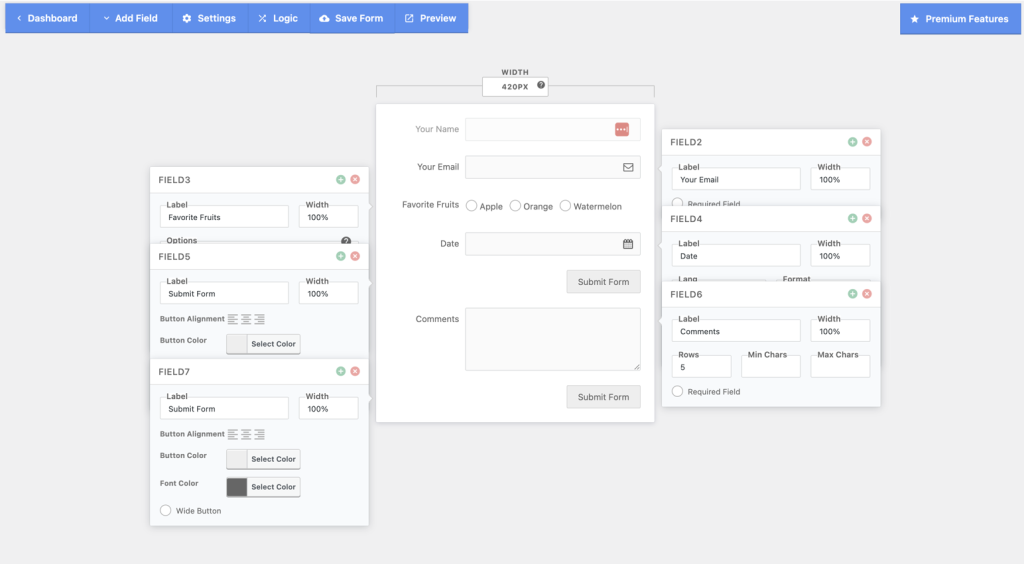
FormCraft combines style and function, offering customizable and visually appealing forms. It’s perfect for organizers who want their registration forms to look great while keeping them easy to use.
Key features
- Drag-and-Drop Form Builder: An interface gives organizations simple capabilities to build forms.
- Conditional Logic: Your form fields can appear or disappear automatically following attendee responses.
- Customizable Styling: Choose from visual designs according to your event branding template guidelines.
- Payment Gateway Integrations: Let visitors make payments using Stripe, PayPal, plus secure payment providers.
- Embed Options: Your website’s landing pages, emails, and websites can incorporate forms through a simple embedding process.
Why it stands out
FormCraft benefits event planners who want to deliver attractive forms that capture attention.
Pricing structure
FormCraft offers a Regular License for $36, which includes future updates and six months of customer support. Users can extend support to 12 months for an additional fee.
4. Visual Form Builder Pro (VFBPro)
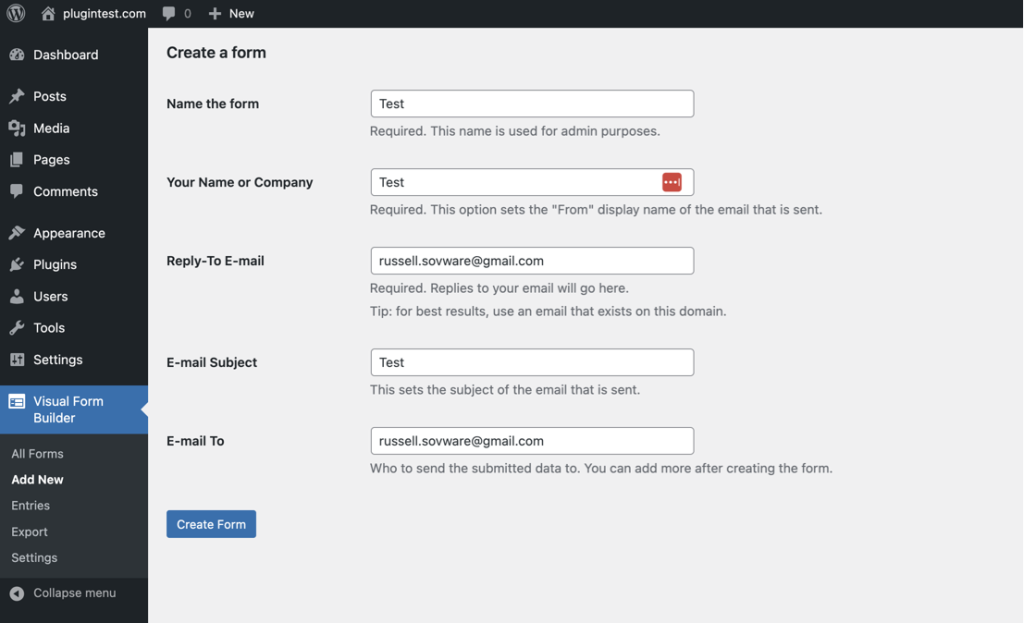
VFBPro provides users with an expert platform to create sophisticated forms for complex event registration systems. Due to its customizable capabilities, VFBPro provides strong configuration options for managing significant, detailed attendee information during extensive events.
Key features
- Multi-Page Forms: Ensure lengthy registration procedures remain easy to perform through several sequential stages.
- File Uploads: Users can upload files that include their ID documents or extra registration details.
- Advanced Email Notifications: Through automation, the system delivers attendee confirmations while sending reminders and updating information on schedule.
- Custom CSS: Users gain total control of the design and layout through the plugin’s customized styling tools.
- Export Tools: You can retrieve attendee data into spreadsheets and additional management applications through built-in exporting functions.
Why it stands out
Larger-scale events favor VFBPro because it provides exceptional control over sophisticated registration processes.
Pricing structure
You can get VFBPro by paying $29 once for lifetime access to all plugin features and updates.
5. NEX Forms
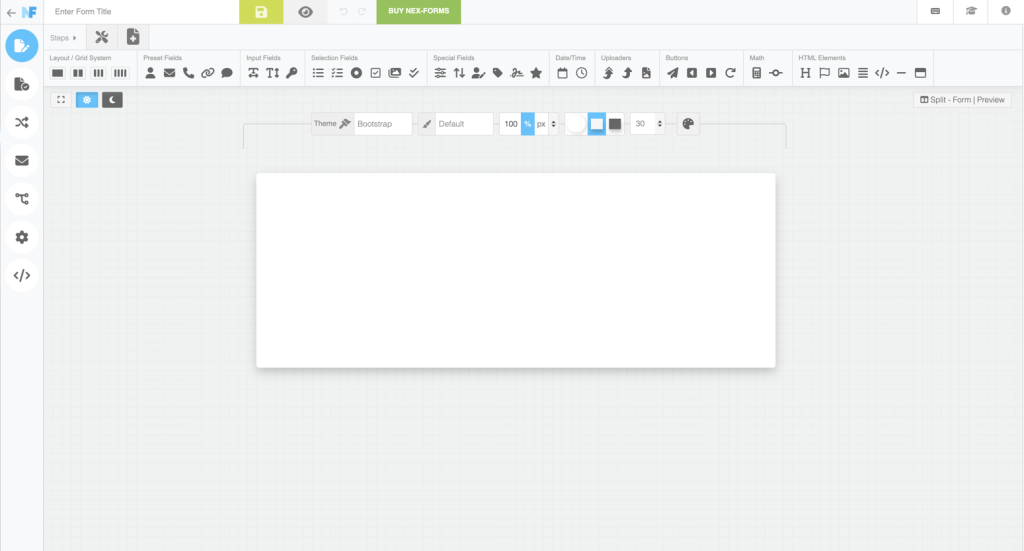
The NEX-Forms solution enables you to find complete adaptability paired with user-friendly functionality. The platform works well for worldwide audiences through adequate language support and responsive functionality.
Key Features
- Responsive Design: Form technology grants versatile dimension adjustments that meet the needs of all screen sizes to deliver seamless interactive experiences.
- Theme Styling Options: The software enables users to assign various pre-loaded formats to their documentation rapidly.
- Conditional Logic: Show or hide fields based on user responses, creating a more personalized and efficient registration process.
- Multi-Language Support: Offer forms in multiple languages to accommodate a diverse audience.
- Form Cloning: Cloning existing forms saves valuable time because you can modify those copies to fit new events.
Why it stands out
NEX-Form’s flexibility and broad range of integrations make it an excellent choice for organizers hosting events in diverse regions.
Pricing structure
Users who purchase the NEX-Forms Regular License will get ongoing updates and six months of support for the payment of $29. Subscribers can access extended support through an additional fee system for 12 months.
These tools bring different feature sets that match different kinds of events. FormGent stands out from other choices with its modern technology and user-focused design to deliver a trouble-free but effective event registration solution for event organizers.
Final Remarks
The right online form builder is crucial for a smooth event registration process. Each tool offers unique features tailored to different needs, from small gatherings to large conferences.
While they simplify data collection and enhance event management, FormGent stands out for its AI-driven functionality and scalability. Explore these form builders to find the best fit for your event and streamline your registration process for a more seamless, efficient experience.
Ready to start? Choose your tool and elevate your event planning today!
FAQ – Best Online Form Builders for Event Registrations
1. Can I customize event forms with these tools?
Yes, all these tools allow customization to match branding and event requirements.
2. Are these tools beginner-friendly?
Yes, most tools, like FormGent and Everest Forms, are intuitive, even for non-technical users.
3. How can online form builders simplify event registration?
They automate data collection, streamline attendee management, and integrate with other platforms, enhancing efficiency.
4. Do these forms support payment integrations for paid events?
Absolutely, from FormGent to NEX, forms integrate with popular payment gateways, making it ideal for managing paid registrations.
5. Can I track registrations in real-time?
Yes, these tools provide real-time updates and analytics to monitor attendee engagement.
6. Do these form builders work with mobile devices?
All mentioned tools offer mobile-friendly forms for a seamless user experience.
7. Are there free versions of these tools?
Yes, tools like Everest Forms and FormGent offer free versions with basic features, while premium features are available in paid plans.
8. What integrations do these tools offer?
FormGent and others integrate with CRMs, email marketing tools, and payment processors for a comprehensive solution.

Leave a Reply