

How to Create a T-shirt Order Form in Minutes Using AI-Form Builder
-
- Tips and Tricks
- 7 mins read

Managing a successful T-shirt business can be challenging if you don’t know how to create a user-friendly order form. A poorly designed form can lead to missed orders, frustrated customers, and lost revenue.
Customers who face issues like incorrect size options, missing colors, or wrong quantities may abandon their carts, resulting in lost sales. This impacts your revenue and creates additional work to correct errors and follow up on incomplete orders. In today’s competitive eCommerce world, every lost order matters.
However, the form plugin makes it easy to create a T-shirt order form. Its no-code interface and smart AI suggestions can help you design a smooth, customizable order form in just a few clicks, improving both customer experience and sales efficiency.
Research from HubSpot indicates that minimizing unnecessary form fields can boost conversion rates by as much as 120%.
Why You Need a T-shirt Order Form
A T-shirt order form serves as a central tool to enhance your ordering system for both efficiency and minimizing errors and support staff. Structured order forms generate multiple important advantages for your business organization.
- Automated data collection: It combines with automatic order processing which saves time and minimizes information errors made by humans.
- Improved customer experience: A properly formed order system incorporates easy-to-understand instructions which makes it easy for customers to submit their purchases.
- Organized inventory tracking: A specialized form will enhance your inventory control because it tracks orders precisely to maintain popular inventory items in stock.
- Enhanced efficiency: The AI-powered form builder FormGent gives you instant form-generation capabilities that help your team move directly to business expansion activities.
By leveraging these benefits, a dedicated T-shirt order form simplifies your workflow, enhances customer satisfaction, and boosts overall sales.
Requirements to Create a T-shirt Order Form
To create a T-shirt order form, you’ll need the following:
- WordPress-Based Website: Ensure you have a WordPress site where you can install the form plugin.
- Form Plugin: Popular form plugins like WPForms, Gravity Forms, or Contact Form 7 can be used, but here, we are using FormGent for its AI-powered capabilities.
- Product Details: Have your T-shirt details, such as sizes, colors, and custom options, ready.
- Branding Assets: Prepare your logo and any other branding materials for a personalized form appearance.
Optional:
- Payment Gateway: Set up accounts with payment services to process payments.
- Shipping Information: Gather shipping options and rates for configuring delivery choices.
What Makes FormGent the Best Choice for Creating a T-shirt Order Form?
FormGent emerges as the ideal solution to build effortless T-shirt order forms through its AI-powered no-code framework together with wide-ranging input possibilities and user-friendly design. FormGent delivers all essential features that prove it to be the ideal solution:
No-code AI-driven form creation for any form
Effortlessly create a professional T-shirt order form with AI-powered automation, eliminating the need for coding and manual setup.
- Easy form building: FormGent serves as a WordPress-native form builder that integrates AI for creating diverse form types, including T-shirt order forms without any need to write actual program code.
- AI-suggested fields: AI-suggested fields enable users to either choose from available fields or receive program-generated recommendations, which generate optimal order form arrangements based on individual business requirements.
Forrester Research shows that AI tools can cut form creation time by over 50%, allowing for quicker deployment of order forms.
All the input types and features you need building for WordPress
With FormGent, you get a feature-rich form builder designed specifically for WordPress, offering all the input types and advanced functionalities needed to create a seamless and fully customizable T-shirt order form.
- 16+ input types: The plugin enables 16 unique input types which simplify the process of collecting customer information alongside T-shirt specifications, including size choices and color options, while allowing users to specify their design preferences.
- Conditional logic & dynamic data: The conditional logic function, together with dynamic data, allows form fields to appear and disappear according to customer choices for delivering personalized results.
- Conversational & multi-step forms: Users will complete more forms if the ordering process is both interactive and multi-step in nature.
- Standalone landing page forms: FormGent helps users find your T-shirt order form easily for improved conversions through its dedicated deployment.
Easy to use, affordable, and packed with features
The FormGent offers various field recommendations that AI suggests based on your business requirements.
- Real-time data integration with Webhooks: Instantly send form submissions to CRMs, spreadsheets, or notification systems for seamless order management.
- Save incomplete form data: The system saves partially finished form data to prevent missed sales opportunities and rescue form entries that faced abandonment.
- Built-in analytics: The platform enables direct monitoring of form performance which lets you make data-based adjustments from the WordPress interface.
- Security & spam protection: The spam protection system includes reCAPTCHA and honeypot filters to verify legitimate orders from fake ones.
With FormGent, you’re not just building a basic order form—you’re unlocking a powerful, AI-enhanced, and conversion-optimized solution designed to streamline T-shirt sales effortlessly while improving user experience and business efficiency.
According to data from Google, using mobile-friendly forms can boost conversion rates by approximately 30%.
Step-by-Step Guide: How to Create a T-shirt Order Form Using FormGent
Creating a seamless T-shirt order form doesn’t have to be complicated. With FormGent’s AI-driven form builder, you can set up a fully functional order form without coding in just a few steps. Follow this step-by-step guide to get started.
Step 1: Install and activate FormGent
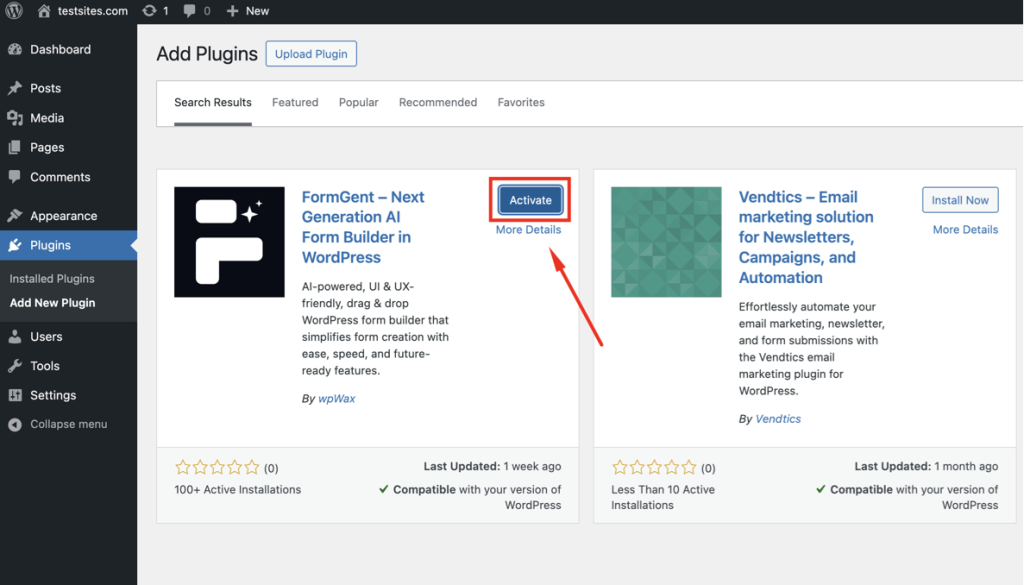
To begin, you need to install this plugin on WordPress and to do that, we need to follow these steps:
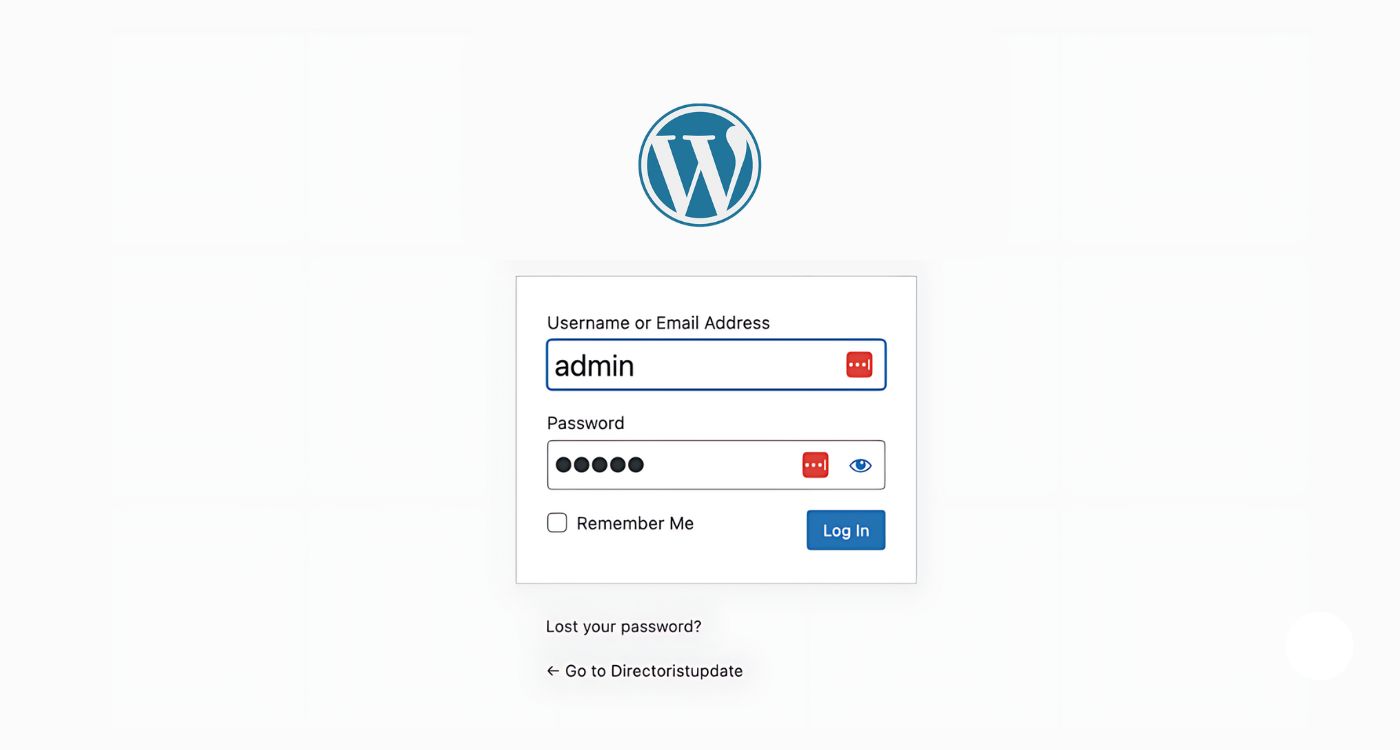
1. Log in to your WordPress dashboard.
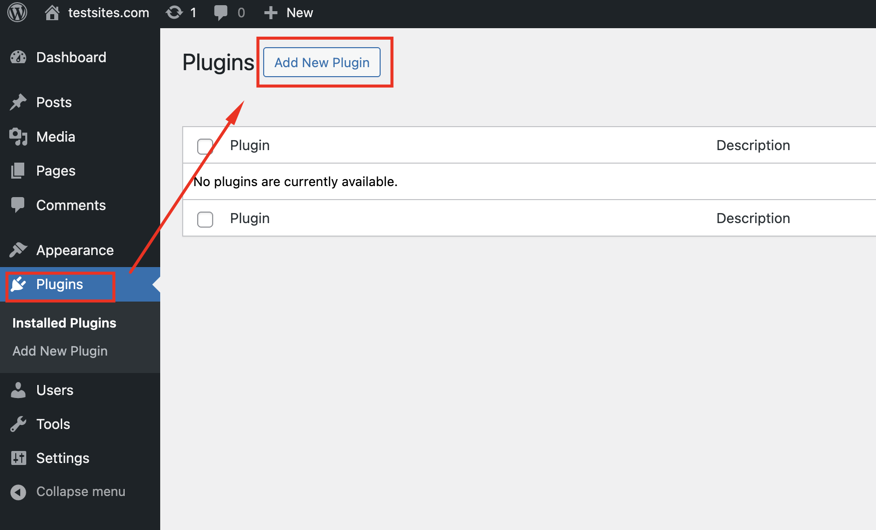
2. Navigate to Plugins → Add New.
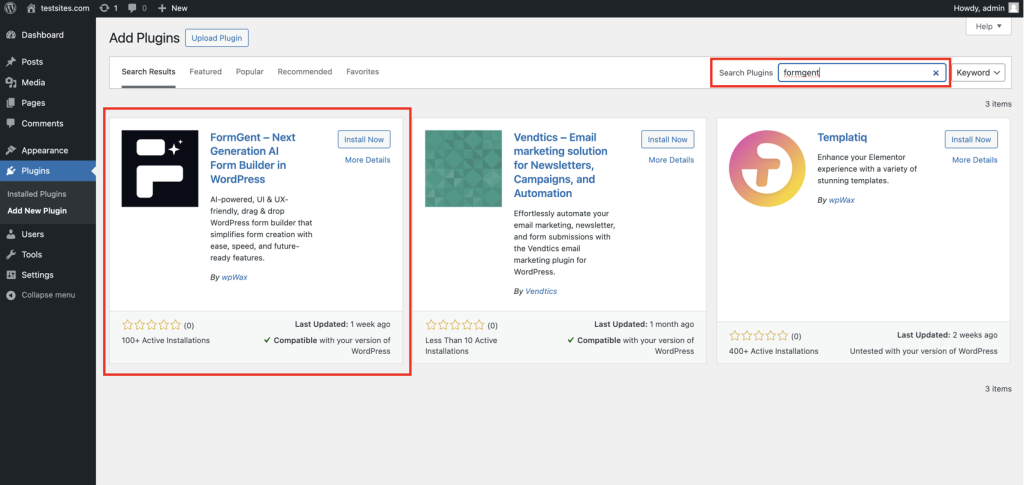
3. Search for FormGent.
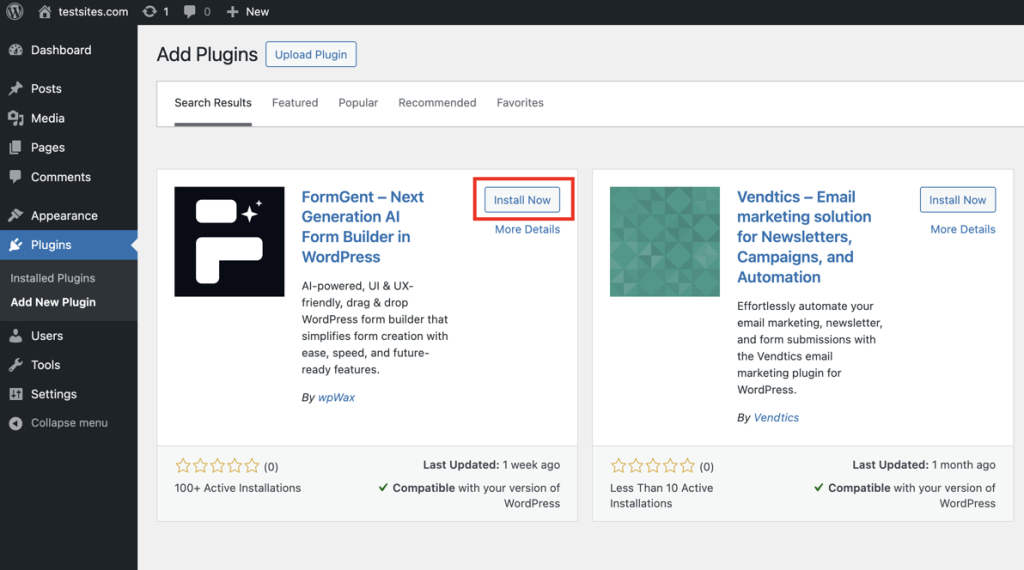
4. Now, from the search results, click Install Now.
5. After installation, Activate the plugin.
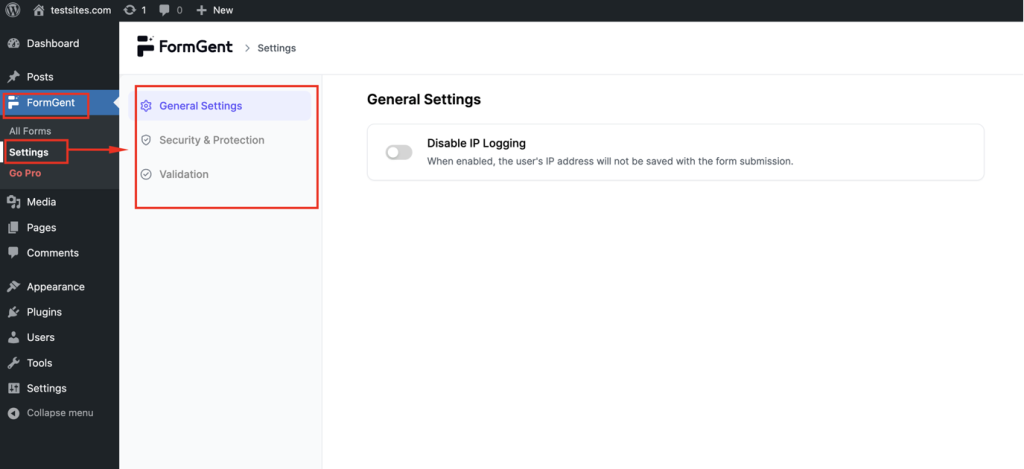
6. Once activated, go to FormGent settings to configure basic options, such as General Settings, Security & Protection, Validation, and Active License.
Step 2: Create a new form
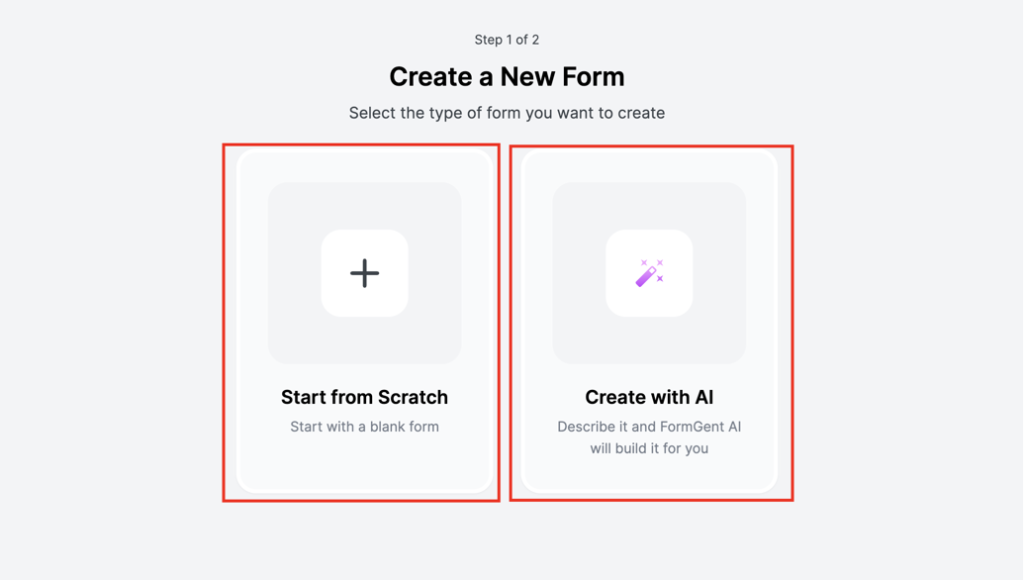
Now that FormGent is installed, it’s time to create your T-shirt order form. FormGent offers two ways to get started:
- Start from Scratch: Build your Form from the ground up using the drag-and-drop builder.
- Create with AI: Let FormGent’s AI generate a complete form based on your description or pre-set prompts.
Using FormGent’s AI to create your T-shirt order form
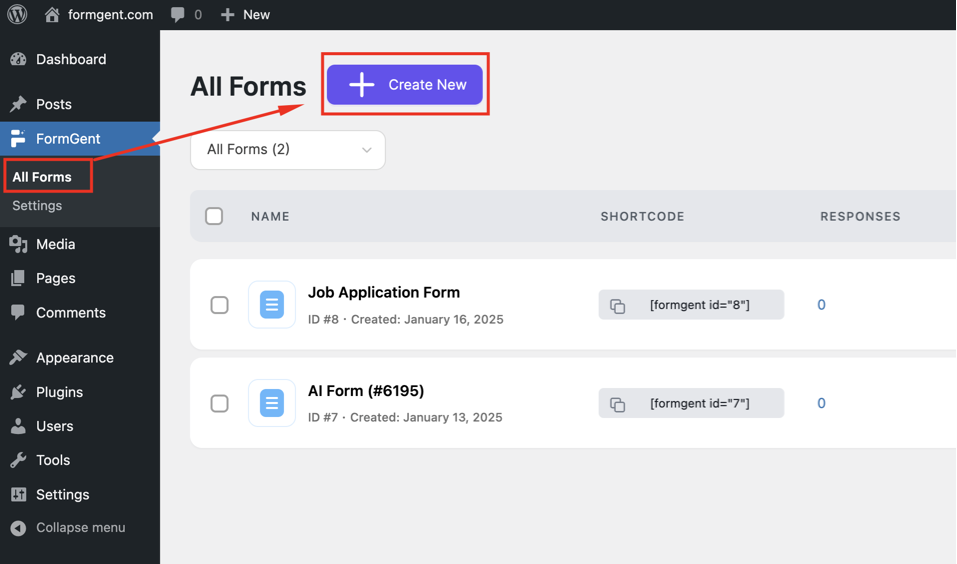
1. Navigate to the FormGent menu in your WordPress dashboard.
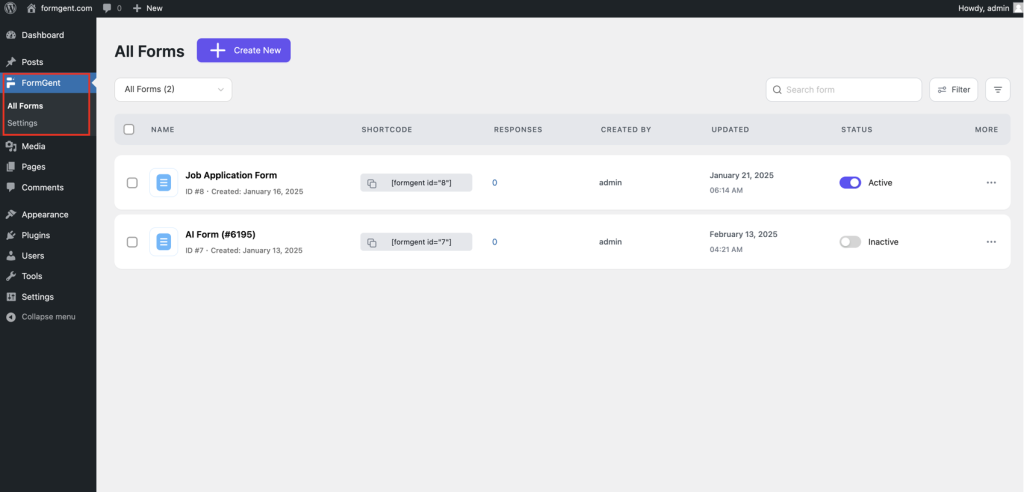
2. Click on “All Forms,” then select “Create New” to start a new form.
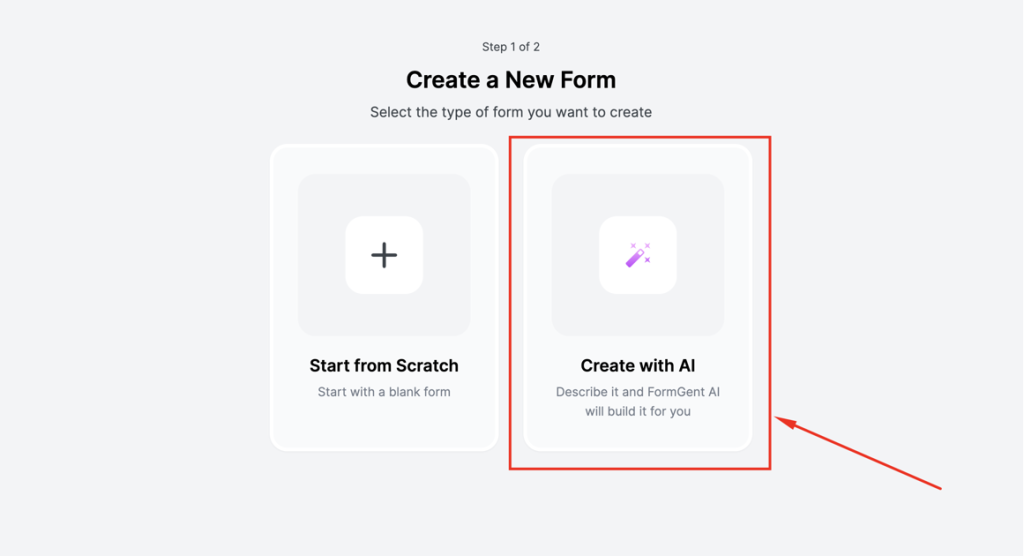
3. Choose the “Create with AI” option to leverage FormGent’s built-in AI for faster form creation.
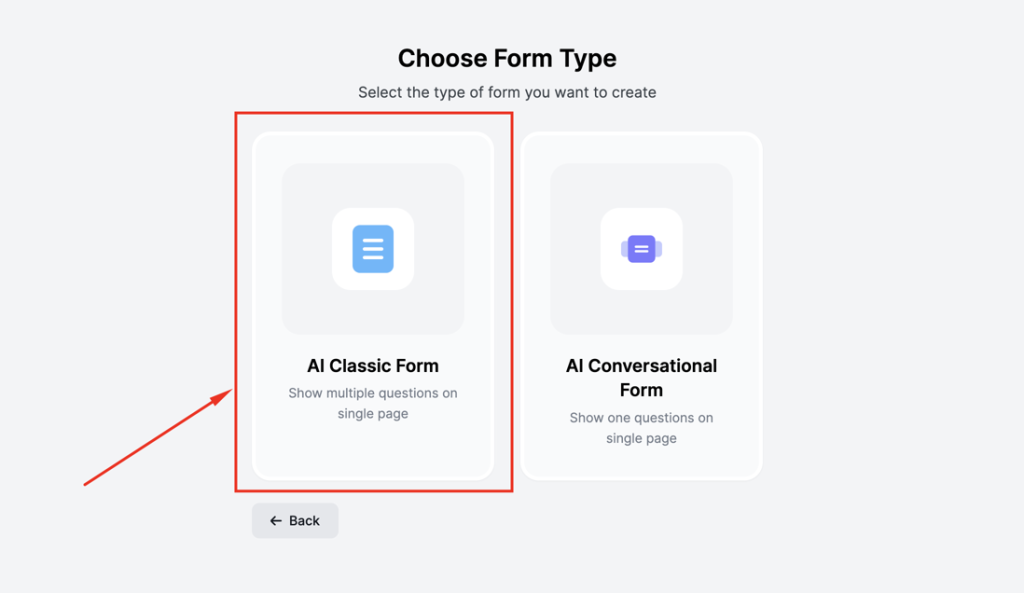
4. Select “AI Classic Form” to begin the automated setup.
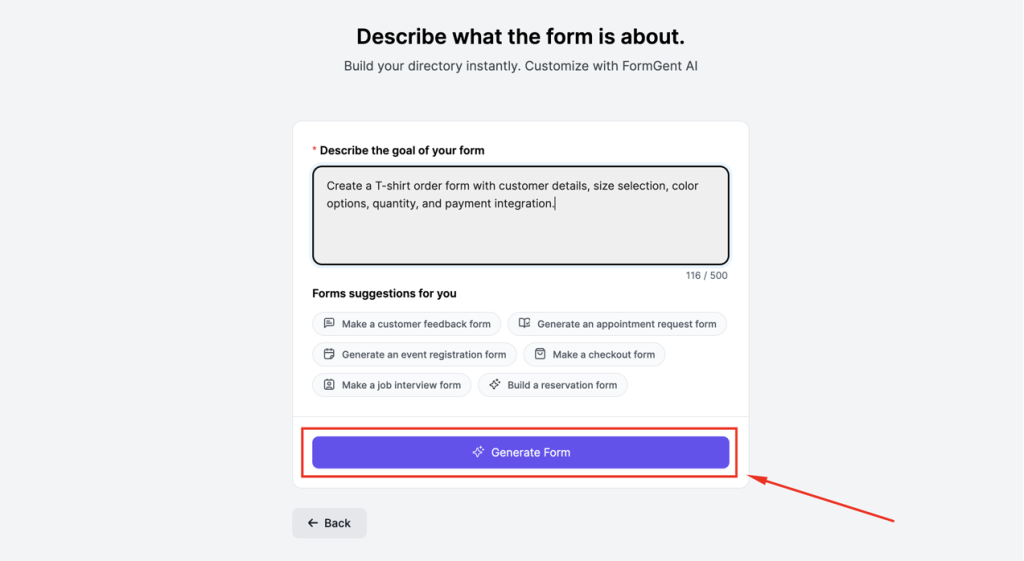
5. In the “Describe the goal of your form” field, briefly describe your Form’s purpose (max 500 characters).
- Example: “Create a T-shirt order form with customer details, size selection, color options, quantity, and payment integration.”
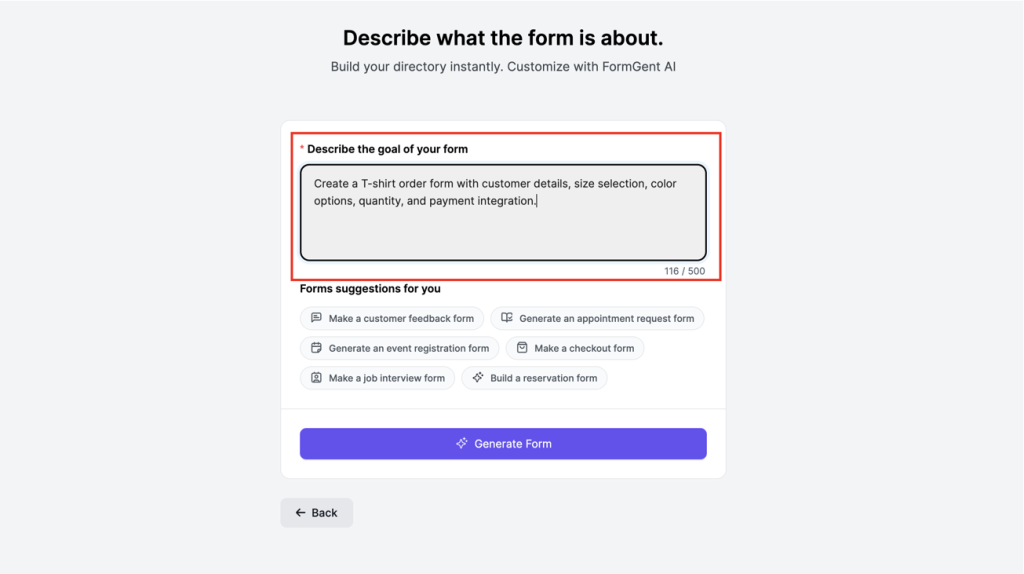
6. Click “Generate Form,” and FormGent’s AI will instantly create a fully functional T-shirt order form tailored to your needs.
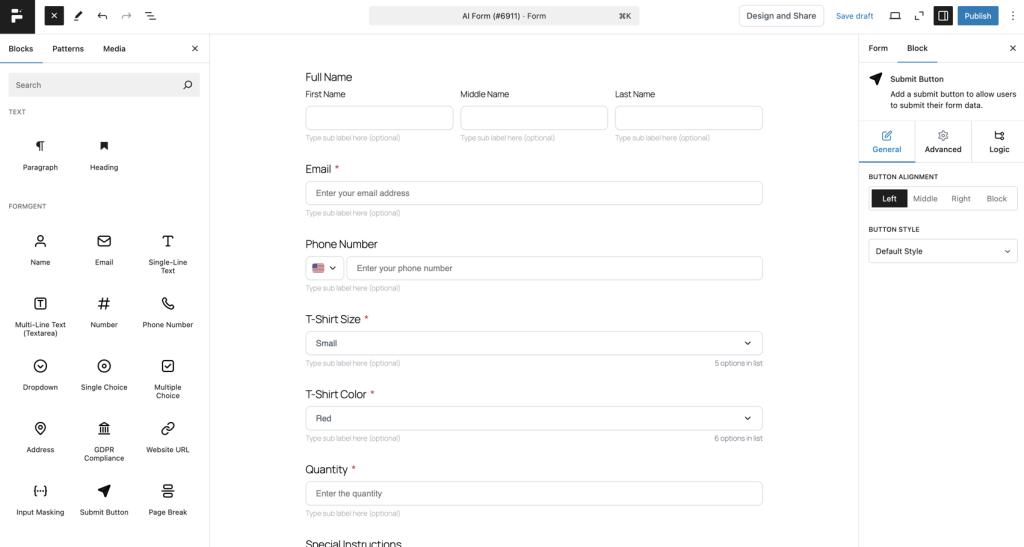
7. Now, your Form is ready within a few seconds.
Step 3: Publish and share your T-shirt order form
Now that you’ve customized the Form’s fields and design, it’s time to make it live. Before sharing, you must publish the Form to enable its visibility and access options.
- Enable Sharing – Activate “Enable Share” to allow access. [If Published]
![Enable Sharing – Activate "Enable Share" to allow access. [If Published]](https://formgent.com/wp-content/uploads/2025/02/3.1-1024x514.png "How to Create a T-shirt Order Form in Minutes Using AI-Form Builder 16")
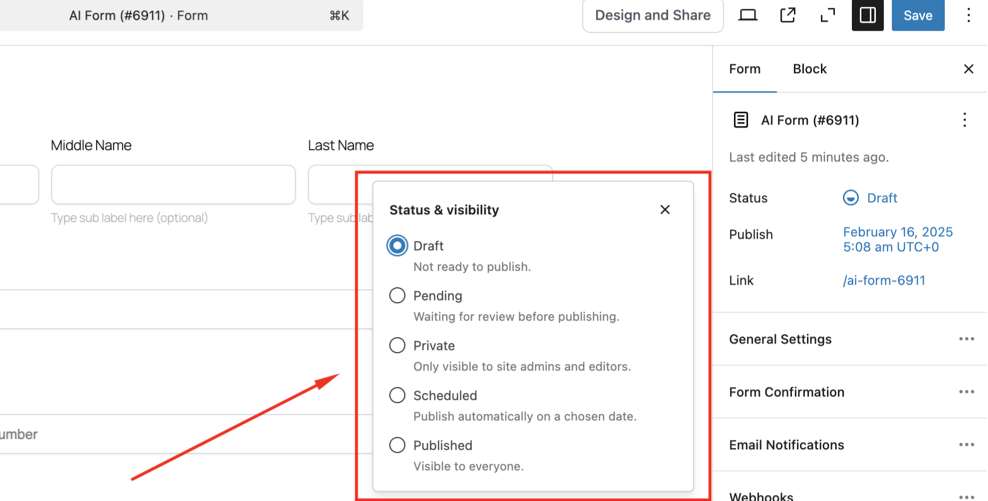
- Set Status – Choose Draft, Pending, Private, Scheduled, or Published.
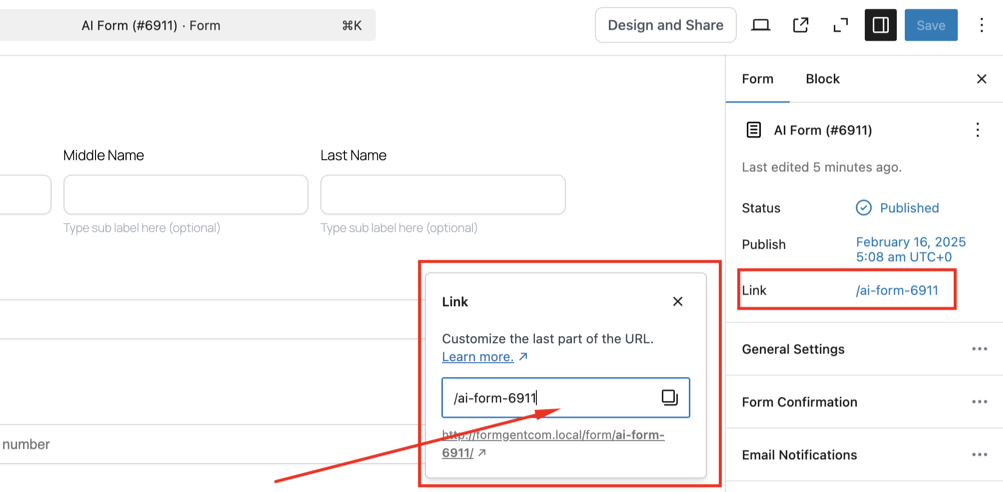
- Customize URL – Make the link easy to remember.
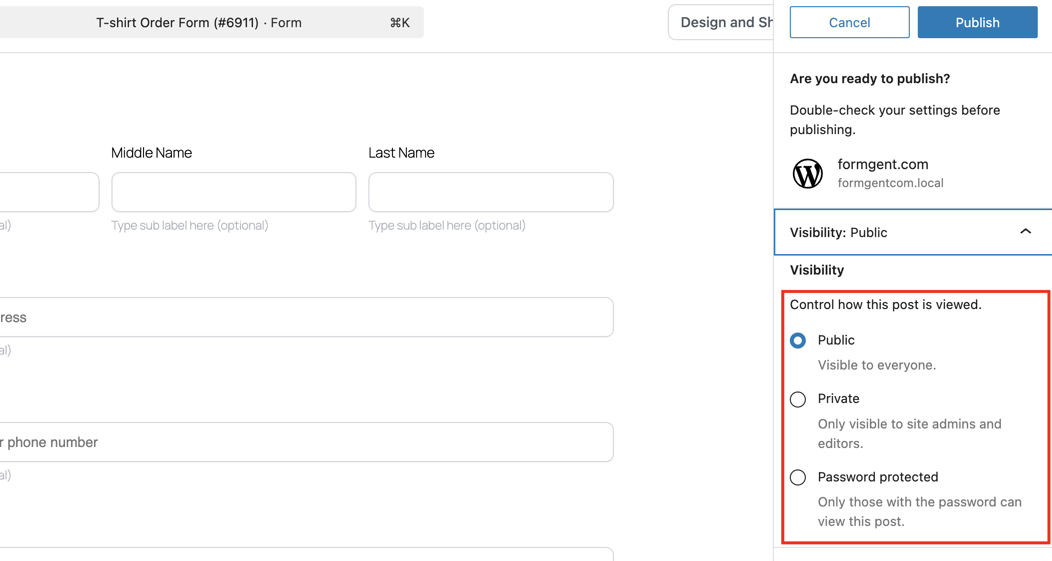
- Quick Publish – Click “Publish,” select Public, Private, or Password Protected, and confirm.
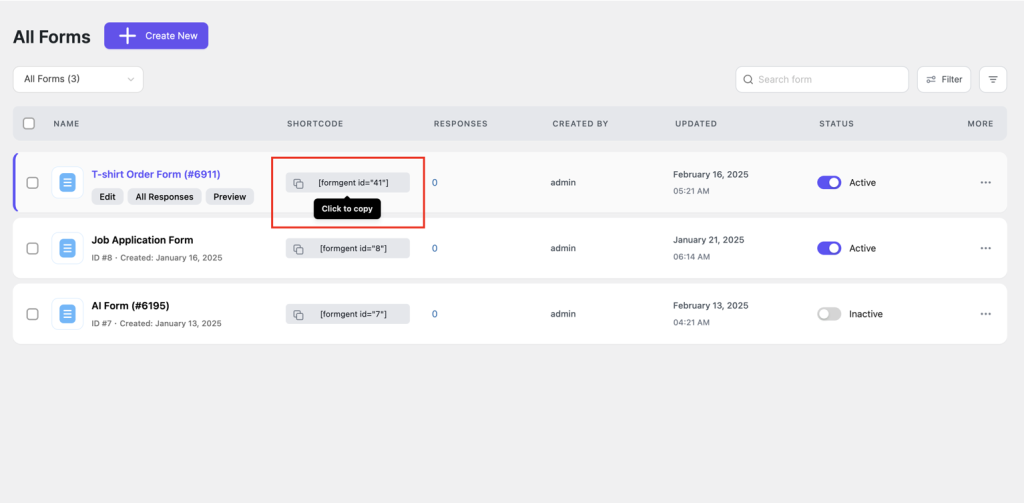
- Share & Embed – Copy the URL for email social media, or use the FormGent shortcode to embed it on your WordPress site.
Your T-shirt order form is live and ready for customers to place orders efficiently. You have successfully learned how to create and customize a powerful T-shirt order form using the FormGent plugin.
Pro Tips for Optimizing Your T-Shirt Order Form
A well-optimized order form enhances usability, branding, and conversions. Follow these quick tips:
- Customize Fields Smartly – Add customer details, T-shirt size, color, and quantity, and use conditional logic for personalized order flows.
- Improve User Experience – Adjust label alignment, placeholders, and required fields for better clarity and ease of use.
- Brand Your Form – Upload a logo, customize the title, and enable a cover image for a polished, professional look.
- Make It Responsive – Optimize width and preview on desktop & mobile to ensure seamless ordering across devices.
- Offer Multiple Payment Options – Integrate various payment gateways to improve customer convenience.
- Enable Order Tracking & Follow-ups – Set up automated emails for order confirmations, tracking updates, and follow-ups.
Final Words
Now, creating a T-shirt order form is quicker and more efficient than ever with FormGent’s AI-powered form builder. Whether you’re a small business or a large enterprise, FormGent simplifies the entire process—from easy setup to seamless automation—giving you more time to focus on growing your business.
With intelligent field suggestions, dynamic customization, and real-time data integration, FormGent allows you to create a T-shirt order form optimized for a smooth customer experience and increased conversions.
Don’t wait any longer—try FormGent today and see how easy it is to create a T-shirt order form that elevates your online business!
Get Started with FormGent Now!
FAQs: How to Create a T-shirt Order Form
1. What is FormGent, and how does it help me create a T-shirt order form?
FormGent is an AI-powered, no-code form builder that simplifies creating customizable T-shirt order forms, helping businesses easily manage orders.
2. Do I need coding skills to create a T-shirt order form with FormGent?
No, FormGent is a no-code solution that allows you to create a T-shirt order form without any technical expertise, making form creation accessible to everyone.
3. How does FormGent’s AI help me create a T-shirt order form?
FormGent’s AI-powered feature automatically generates your T-shirt order form based on your business requirements or description, saving you time and effort.
4. Is FormGent compatible with my WordPress theme?
Yes, FormGent is designed to work seamlessly with all WordPress themes, ensuring full compatibility and easy integration into your website.
5. Does FormGent provide form analytics?
Yes, FormGent includes built-in analytics that track form performance, allowing you to optimize your T-shirt order form and boost conversions.
6. Can I schedule the publication of my T-shirt order form?
Yes, FormGent allows you to schedule your T-shirt order form’s release at a specific date and time, providing flexibility for your business.
7. Is FormGent secure for processing T-shirt orders?
Yes, FormGent ensures the security of your forms with advanced protection features like reCAPTCHA and spam filtering, providing a safe environment for both businesses and customers.


How to Create a Payment Form in WordPress - FormGent
September 26, 2026[…] the running total, and shipping fields only if the product is physical. See our walkthrough on creating a T-shirt order form for a worked example of this exact layout applied to a physical […]