

How Online Form Builders Improve SEO Performance
-
- Tips and Tricks
- 6 mins read
Have you ever wondered if the forms on your website are helping or hurting your SEO efforts?
Studies show that websites with well-optimized forms experience up to 70% higher engagement rates and are 2.3 times more likely to rank on the first page of search engine results. Yet, many businesses overlook how these simple elements can drastically impact their visibility.
Here’s the good news: online form builders are revolutionizing how we approach SEO. They don’t just streamline user interactions—they also enhance page performance, boost dwell time, and reduce bounce rates.
In this article, we will show you how online form builders can improve your website’s SEO, attract more visitors, and turn them into loyal customers.
So, without further ado, let’s dig deeper.
How Online Form Builders Improve SEO Performance
Online form builders do more than just capture user data—they significantly enhance SEO performance by improving user experience, site speed, and engagement.
Here’s how they achieve this, along with examples, statistics, and data to illustrate their impact:
i. Enhanced user engagement and experience
Interactive forms tailored to user needs encourage users to spend more time on your site, reducing bounce rates and increasing dwell time—both of which are crucial SEO signals.

A HubSpot study found that websites with interactive forms, such as lead magnets or feedback surveys, saw a 20% increase in session duration compared to sites without forms.
For instance, a restaurant directory site using custom filters and booking forms engages users longer than a static contact page.
ii. Optimized mobile responsiveness
Modern form builders ensure forms look great and function smoothly on all devices. This aligns with Google’s mobile-first indexing, where mobile-friendly websites rank higher.
FormGent‘s responsive design capability ensures forms adapt to different screen sizes, increasing mobile submissions by up to 38%. Given that 58.99% of global web traffic comes from mobile devices (Statista, 2024), this feature can directly influence rankings.
iii. Faster loading speeds
Online form builders, such as FormGent or Google Forms, use lightweight, optimized code, minimizing the impact on page speed.
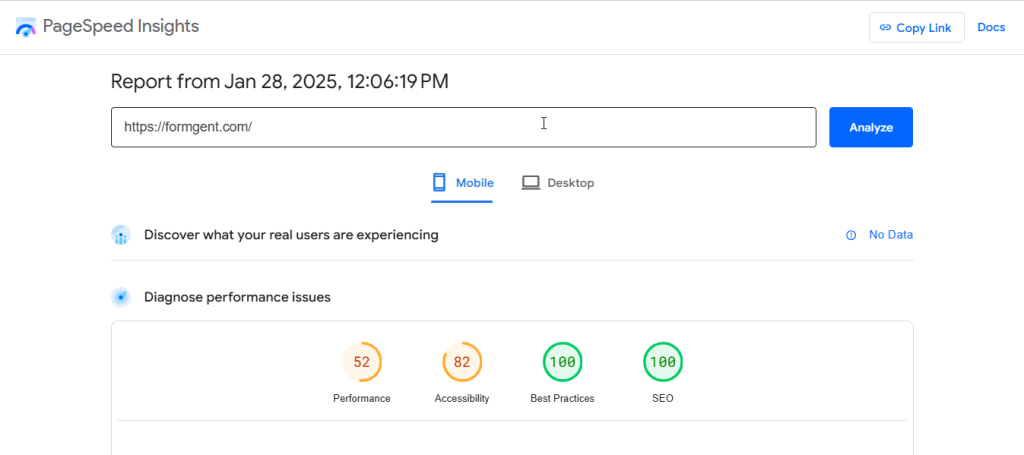
A case study by Think with Google revealed that reducing page load time by 1 second could boost mobile conversions by up to 27%. By using optimized form builders, businesses can achieve similar results while enhancing their SEO.
iv. Structured data implementation
Many form builders allow schema markup integration, enabling search engines to understand the purpose of a form. This can result in rich snippets, improving click-through rates (CTR).
A job directory website using structured data for its application forms saw an 18% increase in CTR when job postings appeared with additional details in search results (source: BrightEdge).
v. Data-driven content optimization
Forms that collect user feedback or preferences provide actionable data to improve content strategies. For example, insights from survey forms can highlight trending topics, allowing you to create content that resonates with your audience.
A Content Marketing Institute report noted that businesses using survey feedback to refine content saw a 21% improvement in organic traffic.
vi. Increased backlink opportunities
Interactive and unique forms, like quizzes or calculators, are highly shareable and can generate backlinks. High-quality backlinks improve domain authority, a critical SEO ranking factor.
BuzzFeed’s interactive quizzes, built using custom form elements, have garnered millions of backlinks, boosting its SEO performance. Similarly, a fitness website using a calorie calculator form saw backlinks increase by 32% within six months.
vii. Integration with analytics
Form builders often integrate with tools like Google Analytics, providing insights into user behavior and drop-off points. Analyzing this data helps improve the overall website experience.
A study by Crazy Egg found that analyzing form interactions reduced form abandonment rates by 26%, leading to higher conversion rates and better rankings.
viii. Reduced spam and enhanced security
Form builders incorporate features like CAPTCHA and reCAPTCHA to reduce spam submissions, which helps maintain clean user data and prevents penalties from search engines for hosting malicious content.

After implementing reCAPTCHA in forms, a SaaS business saw spam submissions drop by 85%, improving the quality of user interactions and SEO health.
Best Practices for Using Online Form Builders to Improve SEO
Using online form builders effectively can contribute to improving your website’s SEO by enhancing user experience, increasing engagement, and generating valuable content.
Here are some best practices for leveraging online form builders to boost your SEO.
Optimize Form placement for user engagement
Place forms strategically on your website to encourage interaction. For example, position lead capture forms on landing pages or contact forms on dedicated contact pages.
Keeping critical forms “above the fold” (visible without scrolling) can maximize conversions and improve user engagement, which positively impacts SEO.
Use SEO-friendly Form titles and descriptions
Incorporate relevant keywords into your form titles, descriptions, and call-to-action (CTA) text. For instance, instead of a generic title like “Subscribe,” use “Sign Up for Our SEO Newsletter.”
Clear, keyword-rich language not only improves SEO but also encourages users to complete the form.
Keep Forms simple and user-friendly
Minimize the number of fields to reduce friction and increase completion rates. For example, a newsletter signup form might only require an email address.
Additionally, ensure your forms are mobile-friendly, as mobile optimization is a critical ranking factor for SEO.
Leverage Forms to capture user-generated content
Use forms to collect customer reviews, testimonials, or survey responses. Displaying this user-generated content on your site can enhance credibility and provide fresh, relevant content that search engines favor.

Surveys and polls can also inspire new blog posts or infographics, further boosting SEO.
Use Forms to build your email list
Offer valuable resources like eBooks, whitepapers, or webinars in exchange for email signups. Growing your email list can drive repeat traffic to your site, indirectly improving SEO.
Segment your audience based on form responses to send targeted content that increases engagement.
Enable SSL and ensure secure Forms
Always serve your forms over HTTPS to protect user data and comply with security best practices. Secure websites are favored by search engines and can improve rankings.
Include a link to your privacy policy to ensure compliance with regulations like the General Data Protection Regulation (GDPR) or California Consumer Privacy Act (CCPA).
Add schema markup for Forms
Use structured data (e.g., ContactPoint or Event schema) to help search engines understand the purpose of your forms.
This can enhance rich snippets in search results, improving click-through rates and driving more organic traffic to your site.
Integrate Forms with analytics
Track form submissions as conversions using tools like Google Analytics or Google Tag Manager. This data helps you measure the effectiveness of your forms and optimize them for better performance.
Conduct A/B testing to experiment with different designs, CTAs, and placements.
Use Forms to generate backlinks
Run contests, giveaways, or collaborations that require users to fill out a form. Promote these campaigns to attract backlinks from participants and other websites.

High-quality backlinks can significantly boost your site’s authority and SEO performance.
Create dedicated landing pages for Forms
Build landing pages around specific keywords and include a form to capture leads. For example, a landing page titled “Free SEO Audit” can attract targeted traffic.
Optimize these pages for fast loading speeds, as page speed is a critical SEO factor.
Use exit-intent popups wisely
Implement exit-intent popups with forms to capture users who are about to leave your site. Offer them a discount, free resource, or newsletter signup to keep them engaged.
However, avoid overly aggressive popups, as they can harm user experience and SEO.
Repurpose Form data for content creation
Analyze data collected from forms (e.g., survey responses or FAQs) to identify common pain points or interests.
Use this information to create blog posts, videos, or guides that address these topics. Personalized content based on form data can also increase engagement and time spent on your site.
Conclusion
Online form builders enhance SEO by improving user experience through responsive design and fast load times. These features help lower bounce rates and increase user engagement, which are crucial for higher search rankings.
Customizable forms enable businesses to gather specific data, informing keyword strategies and targeted content creation. This alignment with user intent drives traffic and boosts website relevance for search engines.
Additionally, seamless integration with analytics tools allows for better tracking of user interactions. This insight supports ongoing optimization, ensuring sustained growth in visibility and SEO performance.

Md. Hamim Khan
Md Hamim Khan is the Content and SEO Manager at FormGent, where he creates engaging content that helps improve online visibility. When he’s not at work, he loves playing cricket and enjoys chatting with friends, family, and colleagues.

Leave a Reply